
In this sixth part of the guide, we configure the STM32 system to synchronize its internal time with an NTP server over the network. This demonstrates how Mongoose can be used to obtain accurate real-world time for applications such as logging, scheduling, timestamps, and time-based automation.
In this guide, we shall cover the following:
- Mongoose wizard configuration.
- Firmware development.
- Results.
1. Mongoose Wizard Configuration:
We shall continue from the previous guide from here.
Open mongoose wizard from here.
From settings, enable NTP client, set the interval to the desired interval (500ms in this guide) and click on generate C/C++ project as follows:
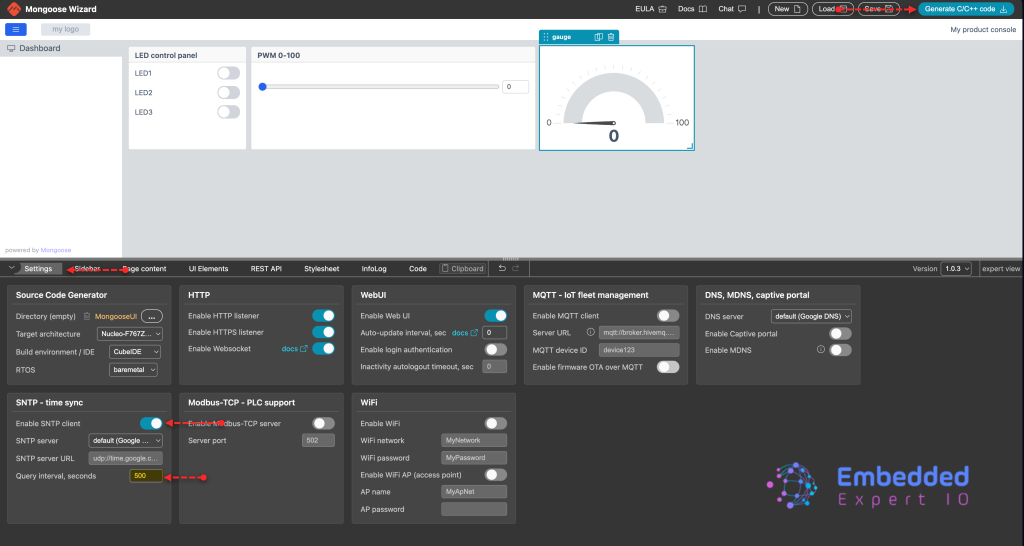
Next, open the generated project and copy the mongoose to the driver folder as follows:
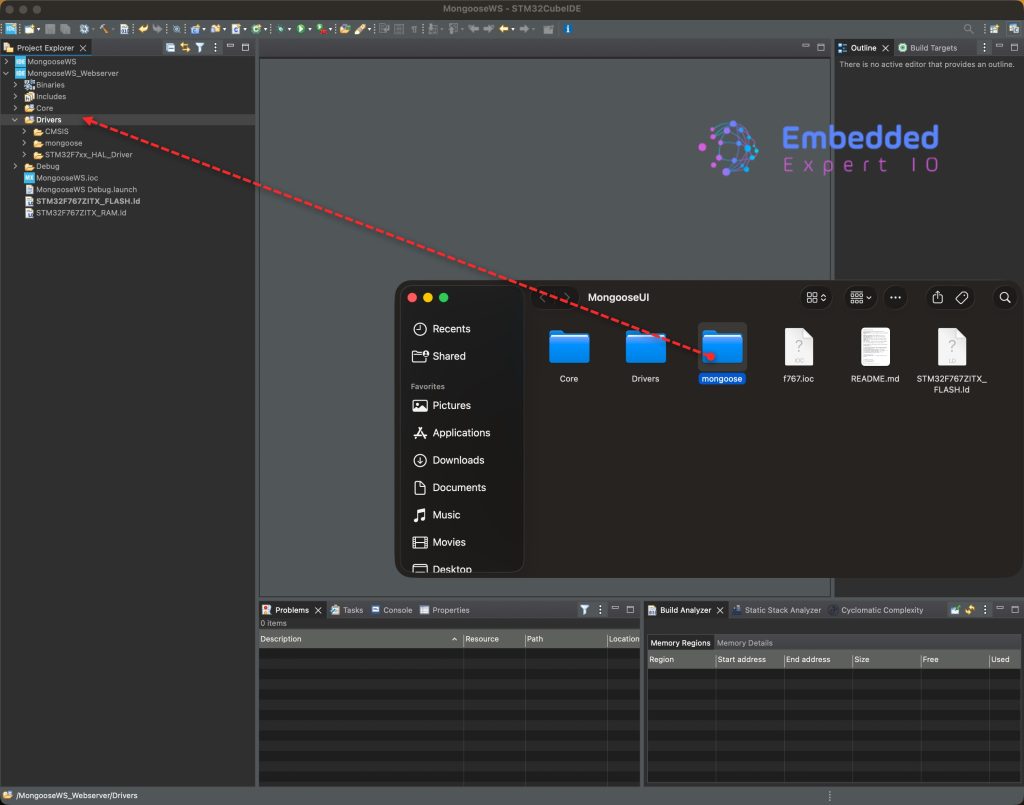
Overwrite the existing files and folder.
Thats all for the mongoose configuration.
2. Firmware Development:
Mongoose offers us an easy method to get the time. The following function can be used to get the time:
mg_now();
This function will return milliseconds passed since Jan 1st 1970. We can utilize this to get the time, date and day of the week.
In main.c file. include the following header file:
#include <time.h>
This will allow us to access time related functions.
In user code begin 0, declare the following function:
**
 * Prints full date, day, and time based on ms and GMT offset
 * @param ms_since_1970: The raw millisecond value
 * @param offset_hours:  The timezone offset (e.g., 3 for Iraq)
 */
void print_full_date_time(unsigned long long ms_since_1970, int offset_hours)
This function takes two parameters as follows:
- Number of milliseconds since 1970.
- Offset for hours, for example GMT+3.
Within the function, first convert the milliseconds to seconds as follows:
time_t total_seconds = (time_t)(ms_since_1970 / 1000);
This will holds the time in seconds since 1970.
Next, calculate the offset to get the current time locally rather than GMT:
total_seconds += (offset_hours * 3600);
Next, break down the time components as follows:
struct tm *t = gmtime(&total_seconds);
Next, declare arrays to hold the days and months as follows:
// Day of the week names
const char *days[] = {"Sunday", "Monday", "Tuesday", "Wednesday", "Thursday", "Friday", "Saturday"};
// Month names (optional, but cleaner than numbers)
const char *months[] = {"Jan", "Feb", "Mar", "Apr", "May", "Jun", "Jul", "Aug", "Sep", "Oct", "Nov", "Dec"};
Next, print the values as follows:
if (t != NULL) {
        printf("--- System Time Update ---\n");
        // tm_wday: 0=Sunday, tm_year: years since 1900, tm_mon: 0-11
        printf("Day:  %s\n", days[t->tm_wday]);
        printf("Date: %02d %s %04d\n", t->tm_mday, months[t->tm_mon], t->tm_year + 1900);
        printf("Time: %02d:%02d:%02d (GMT%+d)\n", t->tm_hour, t->tm_min, t->tm_sec, offset_hours);
        printf("--------------------------\n");
    }
Hence, the entire function as follows:
void print_full_date_time(unsigned long long ms_since_1970, int offset_hours)
{
    // 1. Convert ms to seconds and apply GMT offset
    time_t total_seconds = (time_t)(ms_since_1970 / 1000);
    total_seconds += (offset_hours * 3600);

    // 2. Break down into components
    struct tm *t = gmtime(&total_seconds);

    // Day of the week names
    const char *days[] = {"Sunday", "Monday", "Tuesday", "Wednesday", "Thursday", "Friday", "Saturday"};
    // Month names (optional, but cleaner than numbers)
    const char *months[] = {"Jan", "Feb", "Mar", "Apr", "May", "Jun", "Jul", "Aug", "Sep", "Oct", "Nov", "Dec"};

    if (t != NULL) {
        printf("--- System Time Update ---\n");
        // tm_wday: 0=Sunday, tm_year: years since 1900, tm_mon: 0-11
        printf("Day:  %s\n", days[t->tm_wday]);
        printf("Date: %02d %s %04d\n", t->tm_mday, months[t->tm_mon], t->tm_year + 1900);
        printf("Time: %02d:%02d:%02d (GMT%+d)\n", t->tm_hour, t->tm_min, t->tm_sec, offset_hours);
        printf("--------------------------\n");
    }
}
next, in while 1 loop after mongoose_poll function:
if(HAL_GetTick()%1000==0)
{
	print_full_date_time(mg_now(),3);
}
This will print the current time, date and day of the week each 1 second.
Thats all for the firmware.
You may download the project from here.
Save, build and run the project as follows:

3. Results:
Open your favourite terminal application, set the baudrate to 115200 and you should get the following:
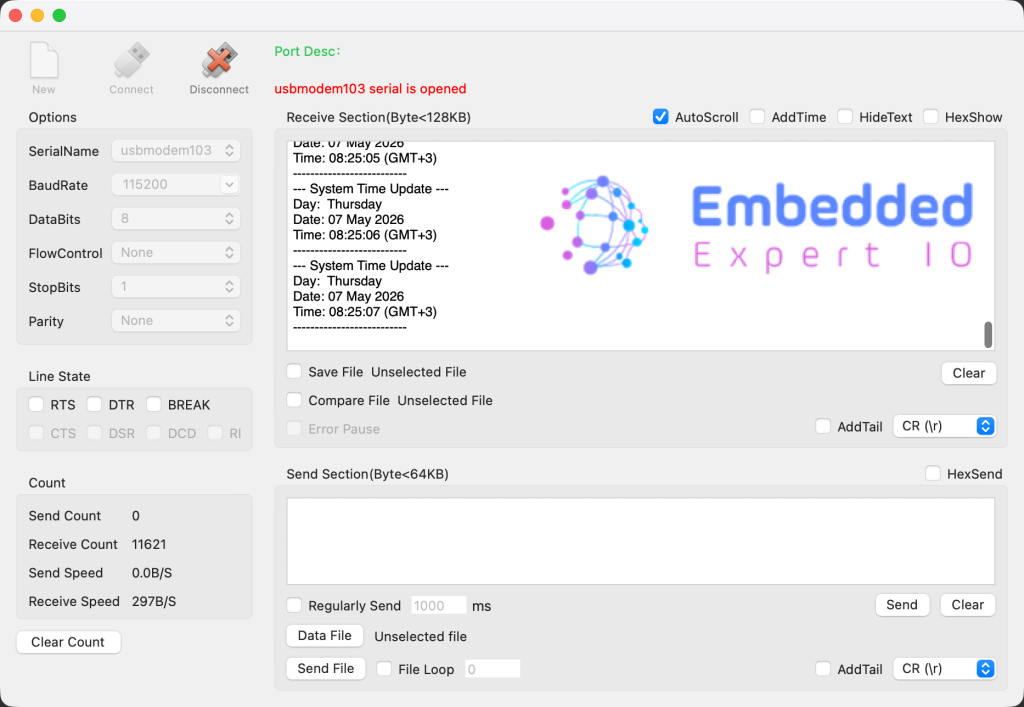
Next, we shall use these data to create some real time plots, data logger etc.
Stay tuned.
Happy coding 😉

Add Comment