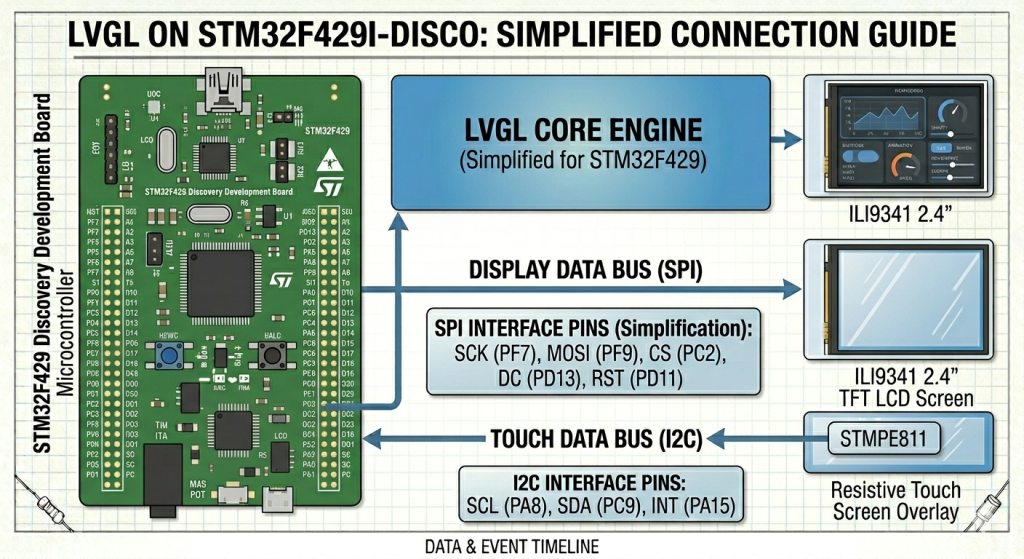
In Part 6, we elevate our project by integrating the Light and Versatile Graphics Library (LVGL), transforming raw hardware drivers into a professional-grade graphical user interface. You will learn how to bridge your touch and display drivers with the library’s HAL and deploy a comprehensive widget demo to showcase the STM32F429’s rendering capabilities.
In this guide, we shall cover the following:
- STM32CubeMX sonfiguration.
- Firmware setup.
- Results.
1. STM32CubeMX Configuration:
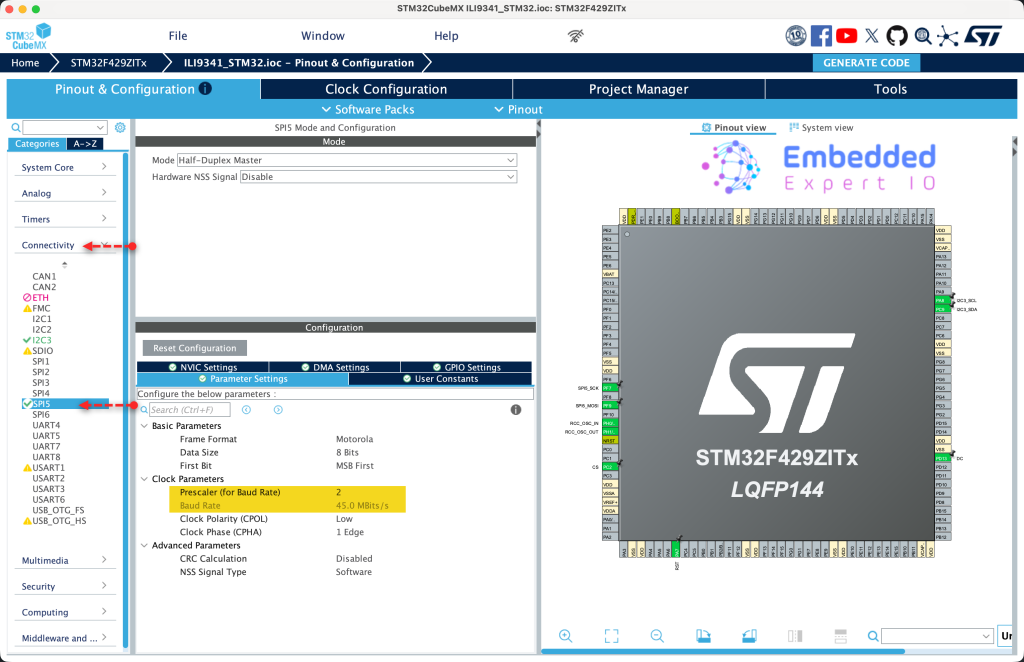
Open the project .ioc file in STM32CubeMX.
From connectivity, select SPI5 and set the orescaler to 2. This will provide 45Mbps transfer speed as follows:
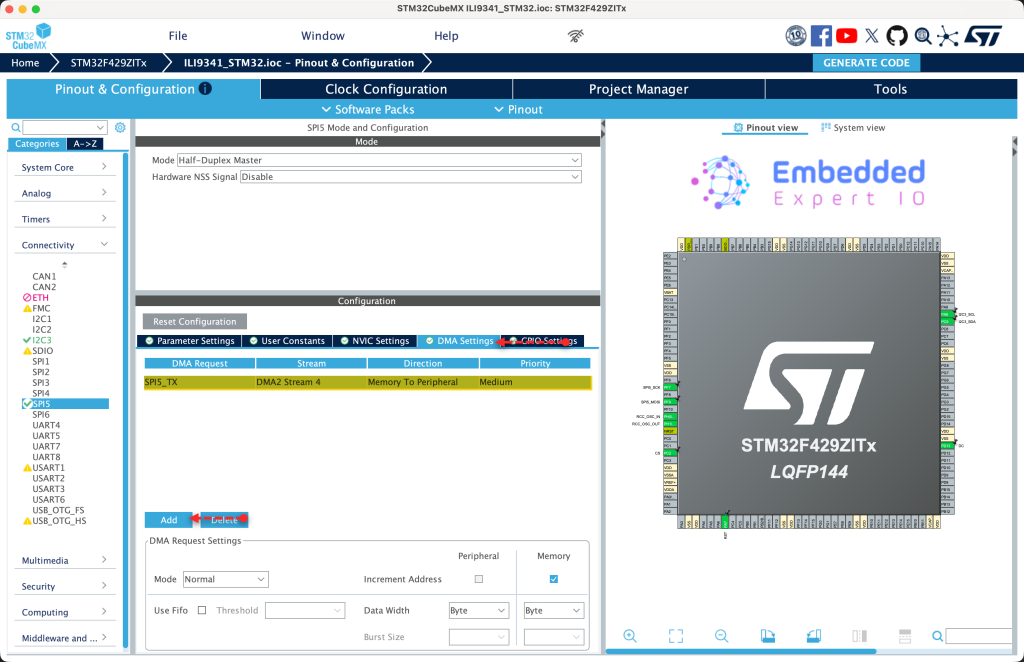
Next, from DMA settings, enable DMA for SPI5_TX as follows:
Finally, enable SPI5 global interrupt and generate code as follows:
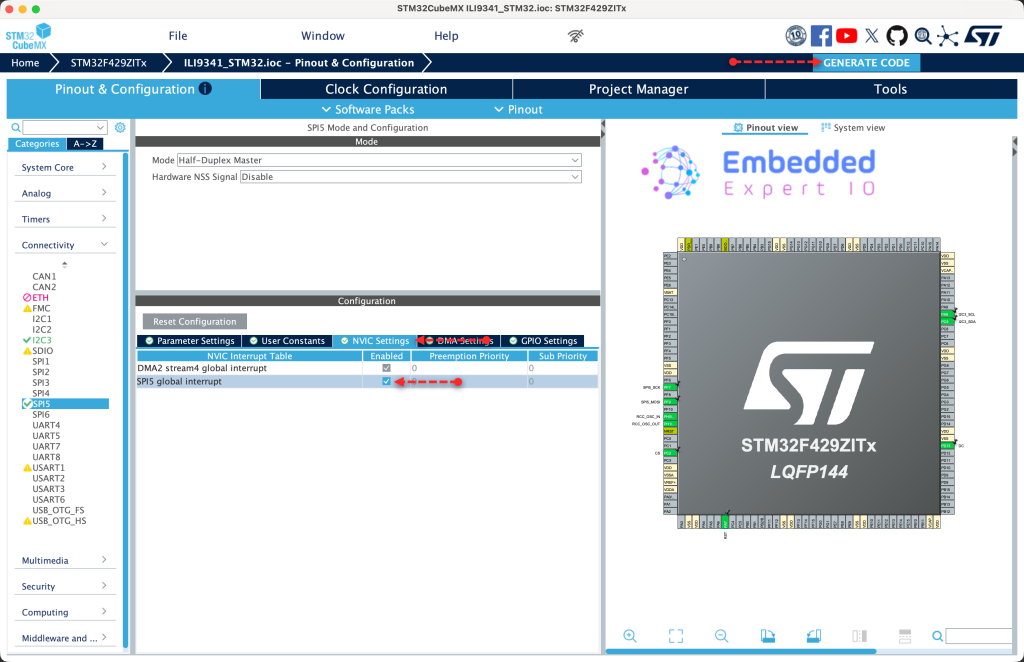
Thats all for the configuration.
2. Firmware Development:
First, head to this github repository and download the latest version as follows:
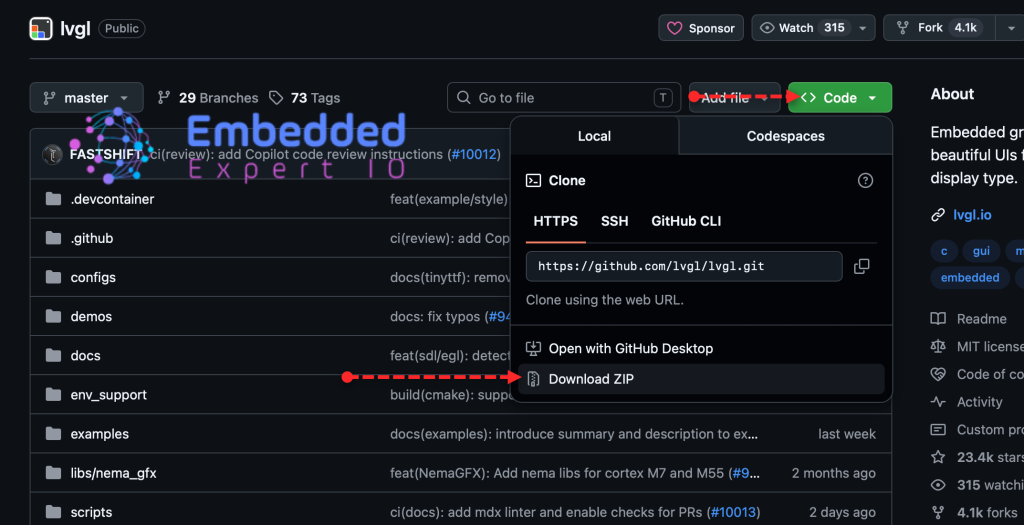
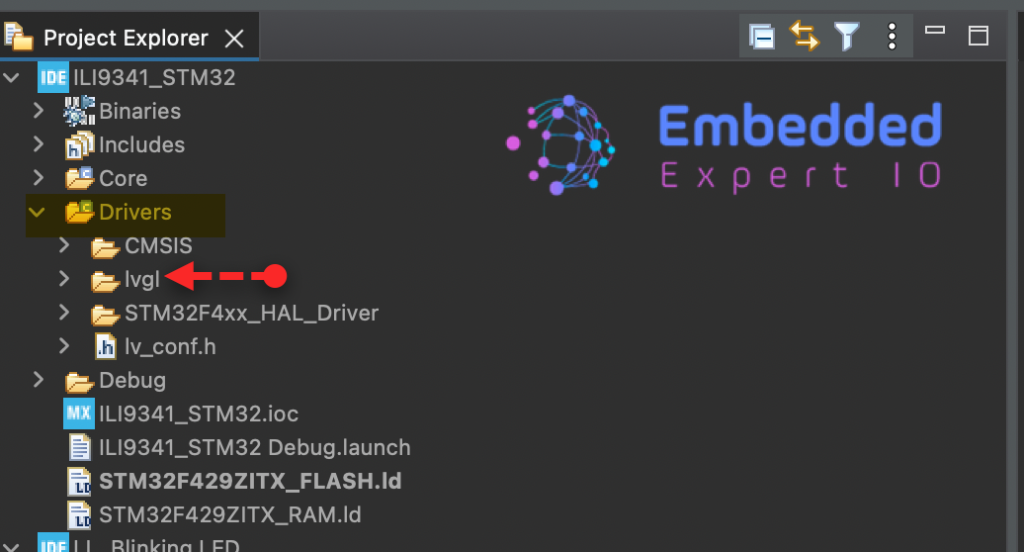
Once downloaded, extract it and rename it simply, lvgl and added to drivers folders as follows:
Next, we shall add LvGL folder to the build process.
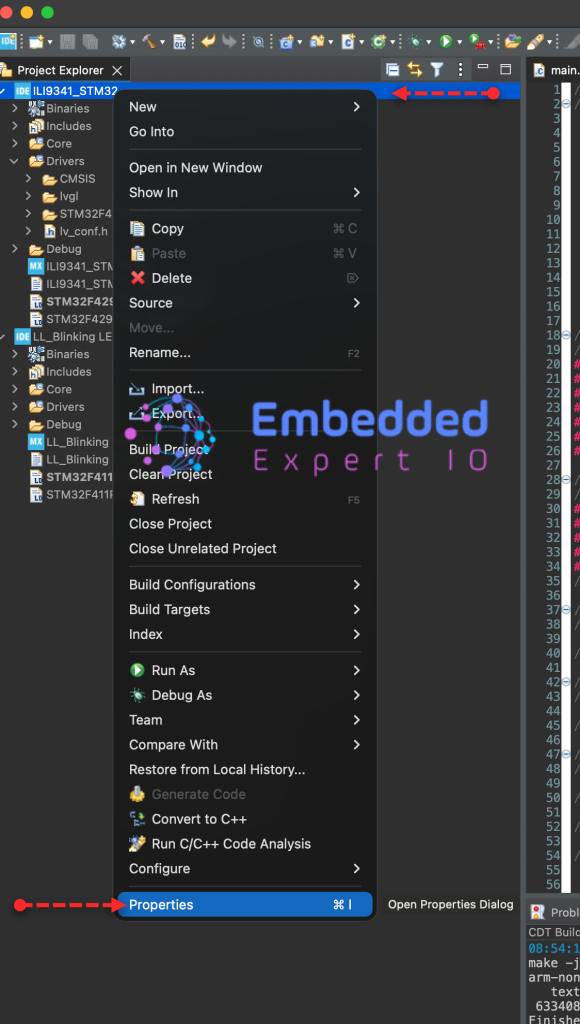
Right click on the project from project explorer and click on properties as follows:
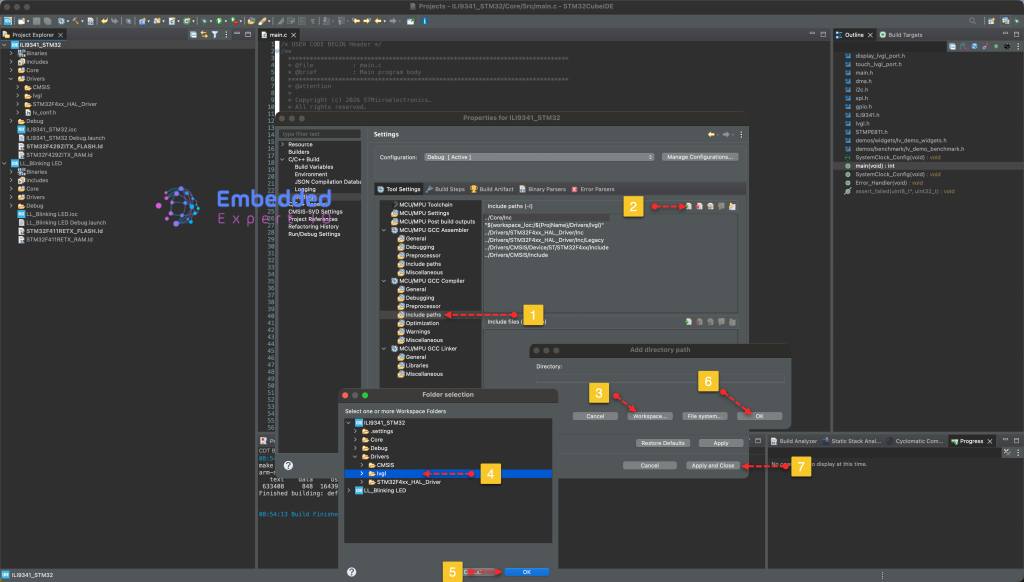
From MCU/MPU GCC compiler, include LvGL path as follows:
Now, we are ready to develop the firmware.
First, in driver folders, create new header file with name of lv_conf.h as follows:
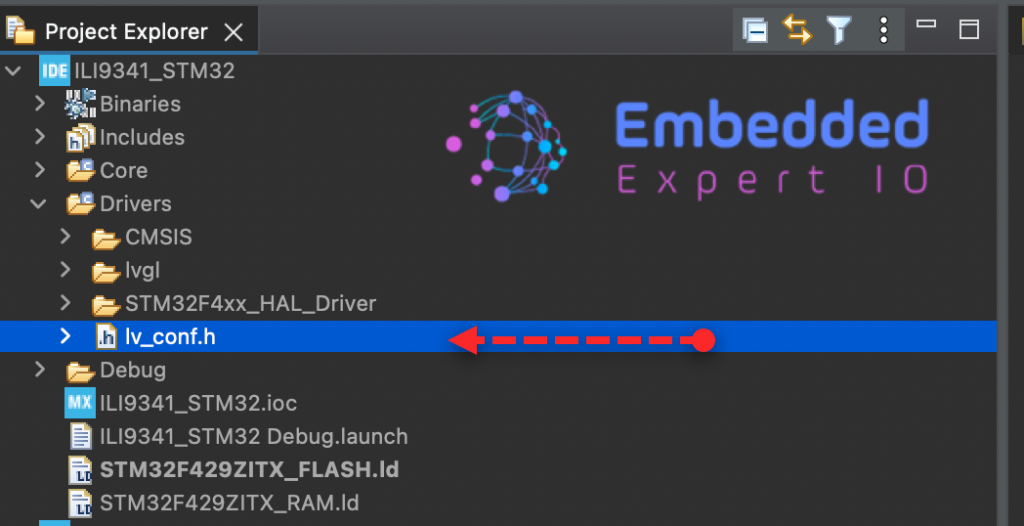
Copy the content of the following header file from this repository.
Once it has been copied, modify the following. First, enable it by setting #if to 1 as follows:
#if 1
By default, the color is set to RGB565, which is the correct one for our display.
#define LV_COLOR_DEPTH 16
Next, enable the demos as follows:
#define LV_BUILD_DEMOS 1
Enable the widget demo as follows:
#define LV_USE_DEMO_WIDGETS 1
Thats all for the lv_conf.h.
Next, open ILI9341.h and add the following function:
void ILI9341_Draw_Bitmap_DMA(uint16_t Xstart, uint16_t Ystart, uint16_t Xend, uint16_t Yend, const uint8_t *Image);
This function shall use DMA to transfer the pixel data rather than polling mode.
In ILI9341.c source file, add the following function:
void ILI9341_Draw_Bitmap_DMA(uint16_t Xstart, uint16_t Ystart, uint16_t Xend, uint16_t Yend, const uint8_t *Image)
{


	uint32_t size = (Xend - Xstart + 1) * (Yend - Ystart + 1) * 2;


	ILI9341_SetWindow(Xstart,Ystart,Xend,Yend);


	WriteCommand(0x2c);

	CS_Select();

	DC_HIGH();
	HAL_SPI_Transmit_DMA(&hspi5, Image, size);


}
Once the DMA transfer is completed, HAL_SPI_TxCpltCallback will be called.
First, define this function as weak function. This will allow the user to override the function with his code as follows:
__weak void ILI9341_Transfer_Completed(void);
For HAL_SPI_TxCpltCallback:
void HAL_SPI_TxCpltCallback(SPI_HandleTypeDef *hspi)
{
	CS_Deselect();
	ILI9341_Transfer_Completed();


}
Simple, deselect the display and call ILI9341_Transfer_Completed function.
Next, create new source and header files with the following names:
- display_lvgl_port.h
- display_lvgl_port.c
- touch_lvgl_port.h
- touch_lvgl_port.c
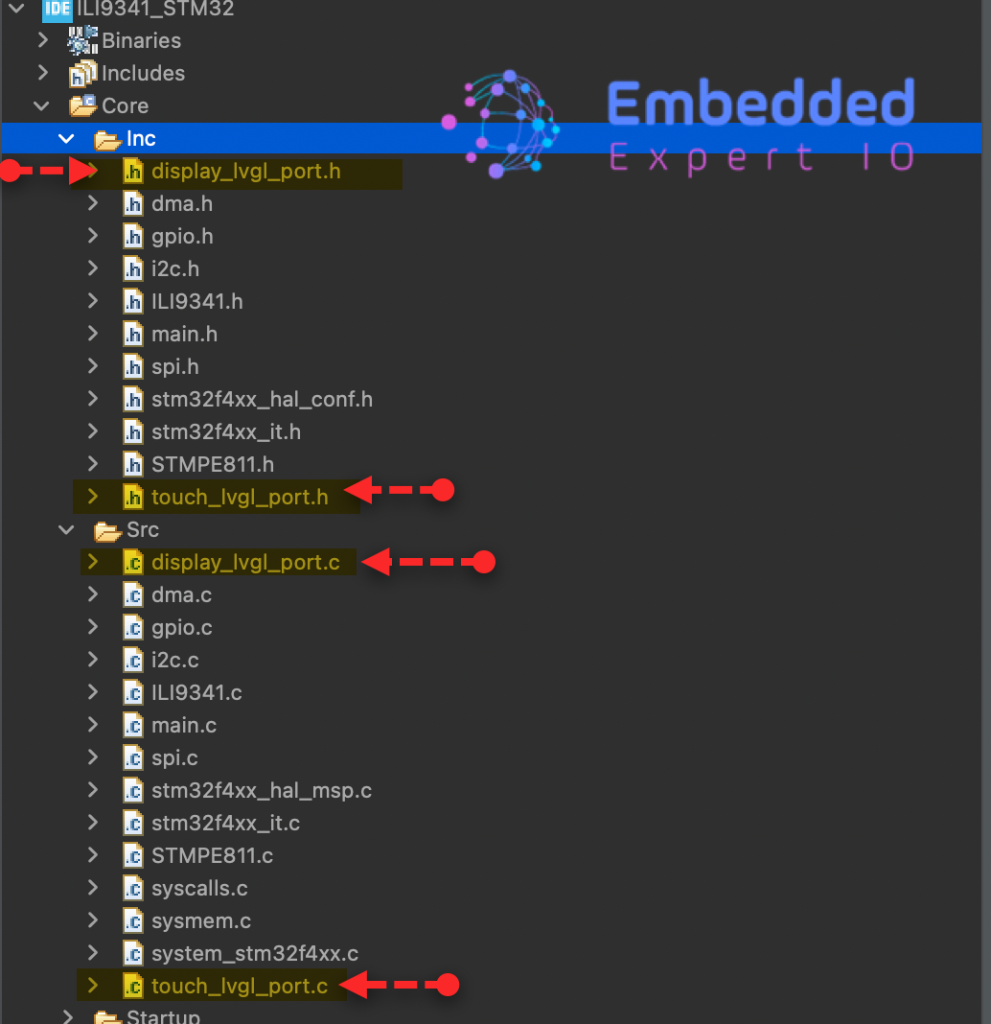
For display_lvgl_port.h, copy the content of the header file in this repository.
Hence, the content of the header file as follows:
#if 1

#ifndef LV_PORT_DISP_TEMPL_H
#define LV_PORT_DISP_TEMPL_H

#ifdef __cplusplus
extern "C" {
#endif

/*********************
 *      INCLUDES
 *********************/

#include "lvgl.h"


/*********************
 *      DEFINES
 *********************/

/**********************
 *      TYPEDEFS
 **********************/

/**********************
 * GLOBAL PROTOTYPES
 **********************/
/* Initialize low level display driver */
void lv_port_disp_init(void);

/* Enable updating the screen (the flushing process) when disp_flush() is called by LVGL
 */
void disp_enable_update(void);

/* Disable updating the screen (the flushing process) when disp_flush() is called by LVGL
 */
void disp_disable_update(void);

/**********************
 *      MACROS
 **********************/

#ifdef __cplusplus
} /*extern "C"*/
#endif

#endif /*LV_PORT_DISP_TEMPL_H*/

#endif /*Disable/Enable content*/
Next, for display_lvgl_port.c source file:
#if 1

/*********************
 *      INCLUDES
 *********************/
#include <display_lvgl_port.h>
#include <stdbool.h>

#include "ILI9341.h"


#define MY_DISP_HOR_RES    240
#define MY_DISP_VER_RES    320

static uint8_t buf_2_1[240*32*2]__attribute__((aligned(4)));;
static uint8_t buf_2_2[240*32*2]__attribute__((aligned(4)));;

lv_display_t  *disp;

/*********************
 *      DEFINES
 *********************/

/**********************
 *      TYPEDEFS
 **********************/

/**********************
 *  STATIC PROTOTYPES
 **********************/
static void disp_init(void);

static void disp_flush(lv_display_t * disp, const lv_area_t * area, uint8_t * px_map);

/**********************
 *  STATIC VARIABLES
 **********************/

/**********************
 *      MACROS
 **********************/

/**********************
 *   GLOBAL FUNCTIONS
 **********************/

void lv_port_disp_init(void)
{
    /*-------------------------
     * Initialize your display
     * -----------------------*/
    disp_init();

    /*------------------------------------
     * Create a display and set a flush_cb
     * -----------------------------------*/
     disp = lv_display_create(MY_DISP_HOR_RES, MY_DISP_VER_RES);
    lv_display_set_flush_cb(disp, disp_flush);


    lv_display_set_buffers(disp, buf_2_1, buf_2_2, sizeof(buf_2_1), LV_DISPLAY_RENDER_MODE_PARTIAL);
    // Change the color format to RGB565_SWAPPED
    lv_display_set_color_format(disp, LV_COLOR_FORMAT_RGB565_SWAPPED);


}

/**********************
 *   STATIC FUNCTIONS
 **********************/

/*Initialize your display and the required peripherals.*/
static void disp_init(void)
{
	ILI9341_Init(ROTATE_0);
}

volatile bool disp_flush_enabled = true;

/* Enable updating the screen (the flushing process) when disp_flush() is called by LVGL
 */
void disp_enable_update(void)
{
    disp_flush_enabled = true;
}

/* Disable updating the screen (the flushing process) when disp_flush() is called by LVGL
 */
void disp_disable_update(void)
{
    disp_flush_enabled = false;
}

/*Flush the content of the internal buffer the specific area on the display.
 *`px_map` contains the rendered image as raw pixel map and it should be copied to `area` on the display.
 *You can use DMA or any hardware acceleration to do this operation in the background but
 *'lv_display_flush_ready()' has to be called when it's finished.*/
static void disp_flush(lv_display_t * disp_drv, const lv_area_t * area, uint8_t * px_map)
{
	if(disp_flush_enabled)
	    {
	        // Simply pass the area coordinates directly to your DMA function
	        ILI9341_Draw_Bitmap_DMA(area->x1, area->y1, area->x2, area->y2, px_map);
	    }
	    else
	    {
	        // If flushing is disabled, we must still inform LVGL to prevent a deadlock
	        lv_display_flush_ready(disp_drv);
	    }

}

void ILI9341_Transfer_Completed(void)
{
	lv_display_flush_ready(disp);
}

#else /*Enable this file at the top*/

/*This dummy typedef exists purely to silence -Wpedantic.*/
typedef int keep_pedantic_happy;
#endif
For touch_lvgl_port.h header file:
#if 1

#ifndef LV_PORT_INDEV_TEMPL_H
#define LV_PORT_INDEV_TEMPL_H

#ifdef __cplusplus
extern "C" {
#endif

/*********************
 *      INCLUDES
 *********************/

#include "lvgl.h"


/*********************
 *      DEFINES
 *********************/

/**********************
 *      TYPEDEFS
 **********************/

/**********************
 * GLOBAL PROTOTYPES
 **********************/
void lv_port_indev_init(void);

/**********************
 *      MACROS
 **********************/

#ifdef __cplusplus
} /*extern "C"*/
#endif

#endif /*LV_PORT_INDEV_TEMPL_H*/

#endif /*Disable/Enable content*/
Next, for touch_lvgl_port.c source file:
#if 1

/*********************
 *      INCLUDES
 *********************/
#include <touch_lvgl_port.h>

#include "STMPE811.h"

/*********************
 *      DEFINES
 *********************/

/**********************
 *      TYPEDEFS
 **********************/

/**********************
 *  STATIC PROTOTYPES
 **********************/

static void touchpad_init(void);
static void touchpad_read(lv_indev_t * indev, lv_indev_data_t * data);
static bool touchpad_is_pressed(void);
static void touchpad_get_xy(int32_t * x, int32_t * y);


/**********************
 *  STATIC VARIABLES
 **********************/
lv_indev_t * indev_touchpad;

/**********************
 *      MACROS
 **********************/

/**********************
 *   GLOBAL FUNCTIONS
 **********************/

void lv_port_indev_init(void)
{
    /**
     * Here you will find example implementation of input devices supported by LittelvGL:
     *  - Touchpad
     *  - Mouse (with cursor support)
     *  - Keypad (supports GUI usage only with key)
     *  - Encoder (supports GUI usage only with: left, right, push)
     *  - Button (external buttons to press points on the screen)
     *
     *  The `..._read()` function are only examples.
     *  You should shape them according to your hardware
     */

    /*------------------
     * Touchpad
     * -----------------*/

    /*Initialize your touchpad if you have*/
    touchpad_init();

    /*Register a touchpad input device*/
    indev_touchpad = lv_indev_create();
    lv_indev_set_type(indev_touchpad, LV_INDEV_TYPE_POINTER);
    lv_indev_set_read_cb(indev_touchpad, touchpad_read);


}

/**********************
 *   STATIC FUNCTIONS
 **********************/

/*------------------
 * Touchpad
 * -----------------*/

/*Initialize your touchpad*/
static void touchpad_init(void)
{
	STMPE811_Touch_Enable();
}

/*Will be called by the library to read the touchpad*/
static void touchpad_read(lv_indev_t * indev_drv, lv_indev_data_t * data)
{
    static int32_t last_x = 0;
    static int32_t last_y = 0;

    /*Save the pressed coordinates and the state*/
    if(touchpad_is_pressed()) {
        touchpad_get_xy(&last_x, &last_y);
        data->state = LV_INDEV_STATE_PRESSED;
    }
    else {
        data->state = LV_INDEV_STATE_RELEASED;
    }

    /*Set the last pressed coordinates*/
    data->point.x = last_x;
    data->point.y = last_y;
}

/*Return true is the touchpad is pressed*/
static bool touchpad_is_pressed(void)
{
	if (isTouched()==touched)
	{
		return true;
	}

	else
	{
		return false;
	}
}

/*Get the x and y coordinates if the touchpad is pressed*/
static void touchpad_get_xy(int32_t * x, int32_t * y)
{
	uint16_t X,Y;
	getTouchValue(&X, &Y);

	*x=X;
	*y=320-Y;


}

#endif
Thats all for the porting process.
Next, open main.c file.
We start by including the following header files:
#include "lvgl.h"
#include <display_lvgl_port.h>
#include <touch_lvgl_port.h>
#include "demos/widgets/lv_demo_widgets.h"
Next, in main function.
First, initialize lvgl:
lv_init();
attach HAL_GetTick to lv_tick_set_cb as follows:
lv_tick_set_cb(HAL_GetTick);
Intialize the display and touch as follows:
lv_port_disp_init();
lv_port_indev_init();
In while 1 loop:
Call lv_timer_handler each 5ms as follows
lv_timer_handler();
HAL_Delay(5);
Save, build the project and run it as follows:

You may download the code from this github repository.
3. Results:
Happy coding 😉

Add Comment