

In the previous guid (here), we took a look at HM-10 module and how to connect it to STM32F4. In this guide, we shall use this module in full duplex to control LED and send strings from STM32F4 to a phone.
In this guide, we shall cover the following:
- Library development.
- Code.
- Results.
7. Library development:
We start off by creating new source and header file with name of hm_10.c and hm_10.h respectively.
Within the header file, include header guard:
#ifndef HM_10_H_
#define HM_10_H_


#endif /* HM_10_H_ */
Declare the following enums which handle the baudrate:
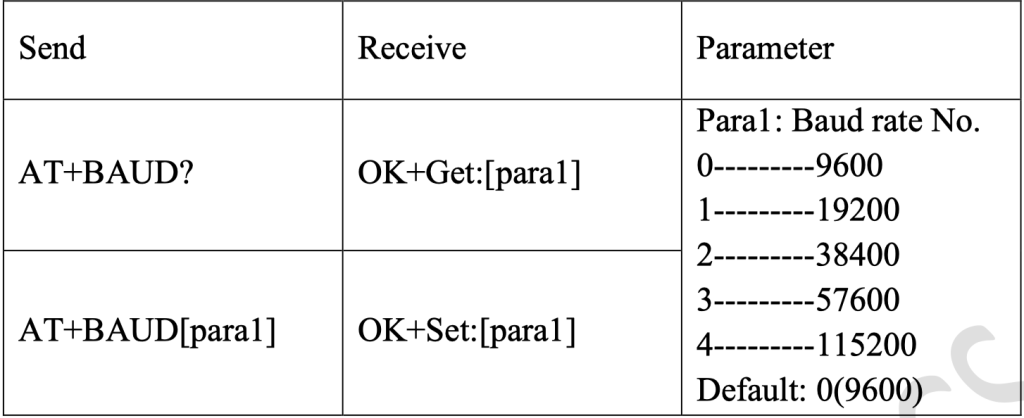
typedef enum
{
	Buad9600=0,
	Buad19200=1,
	Baud38400=2,
	Baud57666=3,
	Baud115200=4

}HM10_BuadRate_Typedef;
Another enum to handle role as master or slave:
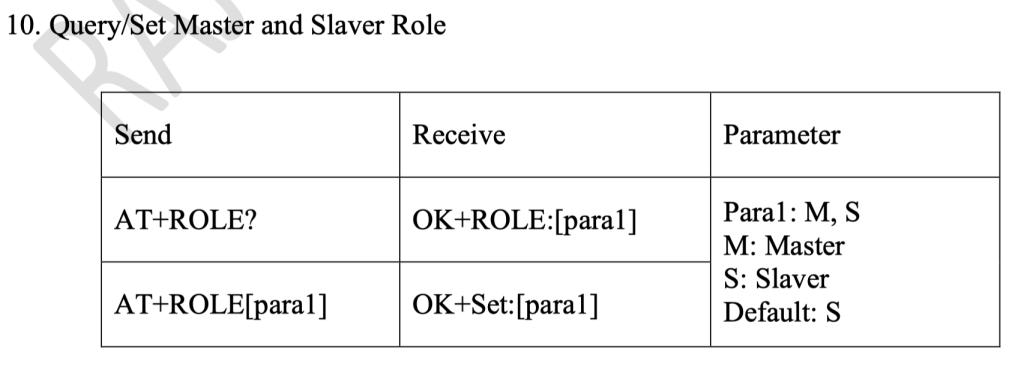
In my case (0 means slave and 1 means master):
typedef enum
{
	Slave=0,
	Master=1

}HM10_Role_Typedef;
Also, set of functions that needed:
void setBuadRate(HM10_BuadRate_Typedef baud);

void setRole(HM10_Role_Typedef role);

void setName(char *c);

void FactoryReset();

void moduleReset();
Hence, the header file as following:
#ifndef HM_10_H_
#define HM_10_H_

#include "stdint.h"

typedef enum
{
	Buad9600=0,
	Buad19200=1,
	Baud38400=2,
	Baud57666=3,
	Baud115200=4

}HM10_BuadRate_Typedef;


typedef enum
{
	Slave=0,
	Master=1

}HM10_Role_Typedef;


void setBuadRate(HM10_BuadRate_Typedef baud);

void setRole(HM10_Role_Typedef role);

void setName(char *c);

void FactoryReset();

void moduleReset();


#endif /* HM_10_H_ */
Now, in the source code, include the following header files:
#include "hm_10.h"
#include "hm_10_uart.h"
#include "stdio.h"
#include "led.h"
Declare a character array to handle the AT command:
static char AT_Array[20];
Volatile variable to store the incoming data from UART:
volatile char uart1_rec;
Set buadrate function will take the enum of buadrate as argument:
void setBuadRate(HM10_BuadRate_Typedef baud)
{

	sprintf(AT_Array,"AT+BAUD%d\r\n",baud);
	hm10_write_at_command(AT_Array);
}
By sending for example (AT_BAUD0), it will set the buadrate to 9600.
To set the role function, it will take role enum as argument:
void setRole(HM10_Role_Typedef role)
{
	sprintf(AT_Array,"AT+ROLE%d\r\n",role);
	hm10_write_at_command(AT_Array);
}
Set name function will set the name of the module and takes string as argument:
void setName(char *c)
{
	sprintf(AT_Array,"AT+NAME%s\r\n",c);
	hm10_write_at_command(AT_Array);
}
To factory reset the module (default state):
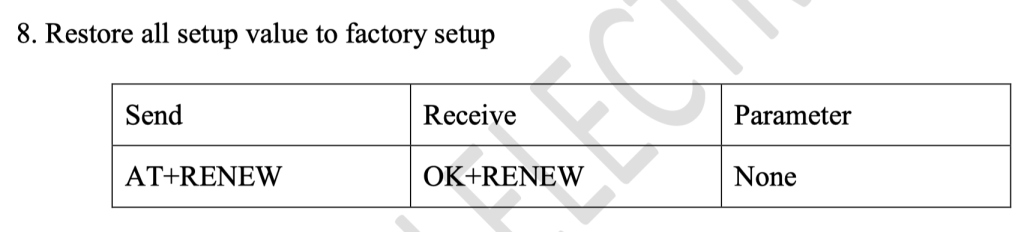
void FactoryReset()
{
	sprintf(AT_Array,"AT+RENEW\r\n");
	hm10_write_at_command(AT_Array);
}
To restart the module (exit AT mode):
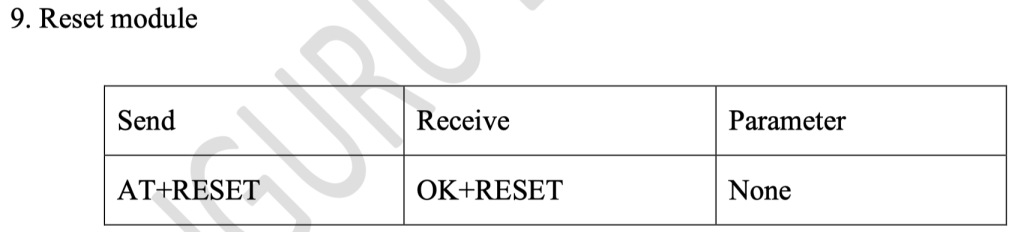
void moduleReset()
{
	sprintf(AT_Array,"AT+RESET\r\n");
	hm10_write_at_command(AT_Array);
}
Since the UART is used in interrupt mode to receive the character, we shall declare a callback function as weak:
Declaring a function as weak it, you can override it in another source file without any issue:
__WEAK void HC_12_Callback(unsigned char ch)
{
	if (ch == '1')
	{
		led_toggle();
	}
}

void USART1_IRQHandler (void)
{

	if(USART1->SR & USART_SR_RXNE){
	uart1_rec=USART1->DR;
	HC_12_Callback(uart1_rec);

	USART1->SR &= ~USART_SR_RXNE;}


}
In the main.c file:
#include "hm_10_uart.h"
#include "led.h"
#include "time_base.h"
#include "exti.h"
#include "hm_10.h"

uint32_t previousTicks;


int main()
{

	Ticks_Init(16000000);
	PC13_EXTI_Init();
	led_init();
	hm10_uart_init(9600,16000000);
	FactoryReset();
	delay(100);
	moduleReset();
	delay(100);

	while(1)
	{
		if(get_Ticks()-previousTicks>=1000)
		{

			hm10_write_string("Hello from STM32F411RE Nucleo-64\r\n");
			previousTicks=get_Ticks();
		}
	}


}
Related course
Continue from module commands to BLE concepts
The module now exchanges application data with the phone. To explore the BLE layer more deeply, review the course on GAP, GATT and custom services using BlueNRG-MS. It uses different hardware and a vendor-stack workflow, so it is a deliberate next learning path rather than an HM10 driver course.
8. Code:
You may download the code from here:
9. Results:
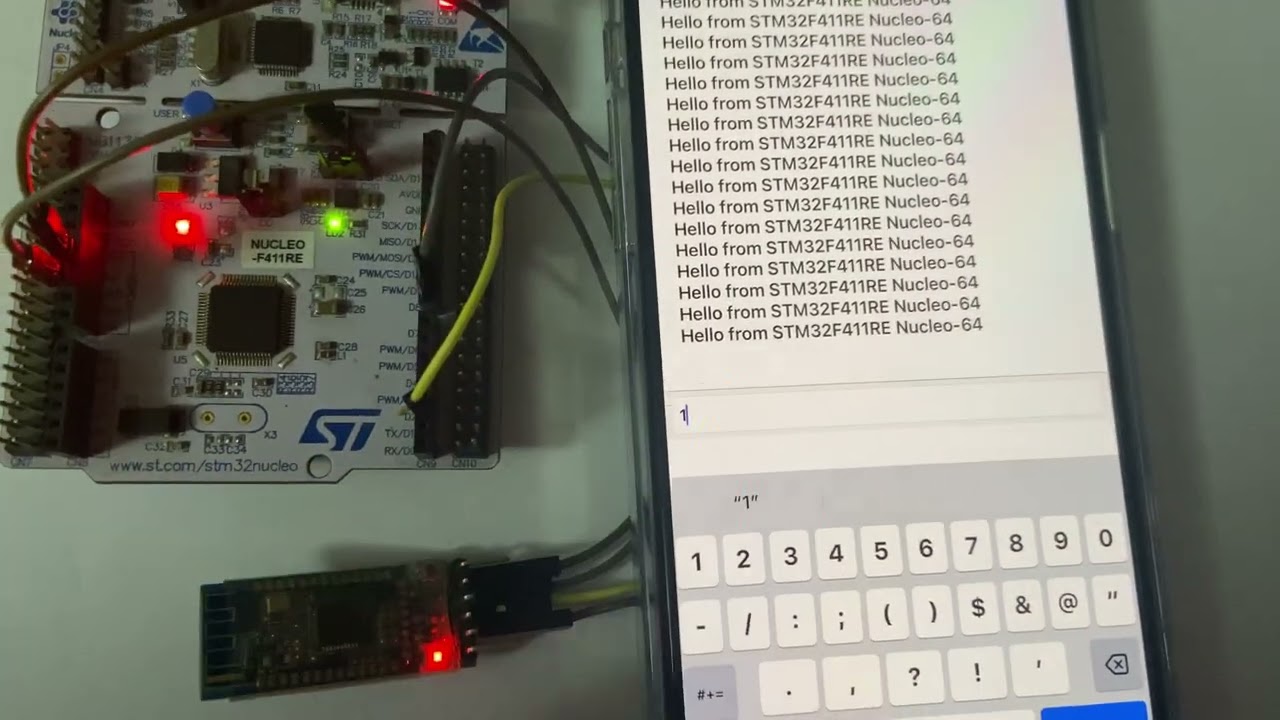
HM-10 BLE interface with STM32F4
Hosted by YouTube. Playing may use YouTube cookies. Privacy details
Happy coding 🙂

Discussion