

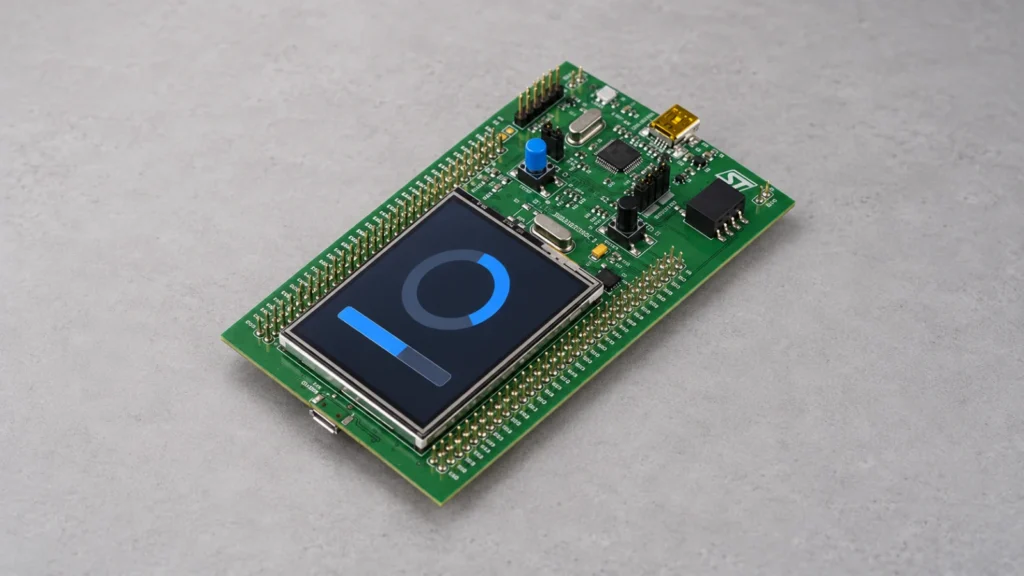
In Part 6, we elevate our project by integrating the Light and Versatile Graphics Library (LVGL), transforming raw hardware drivers into a professional-grade graphical user interface. You will learn how to bridge your touch and display drivers with the library’s HAL and deploy a comprehensive widget demo to showcase the STM32F429’s rendering capabilities.
In this guide, we shall cover the following:
- STM32CubeMX sonfiguration.
- Firmware setup.
- Results.
1. STM32CubeMX Configuration:
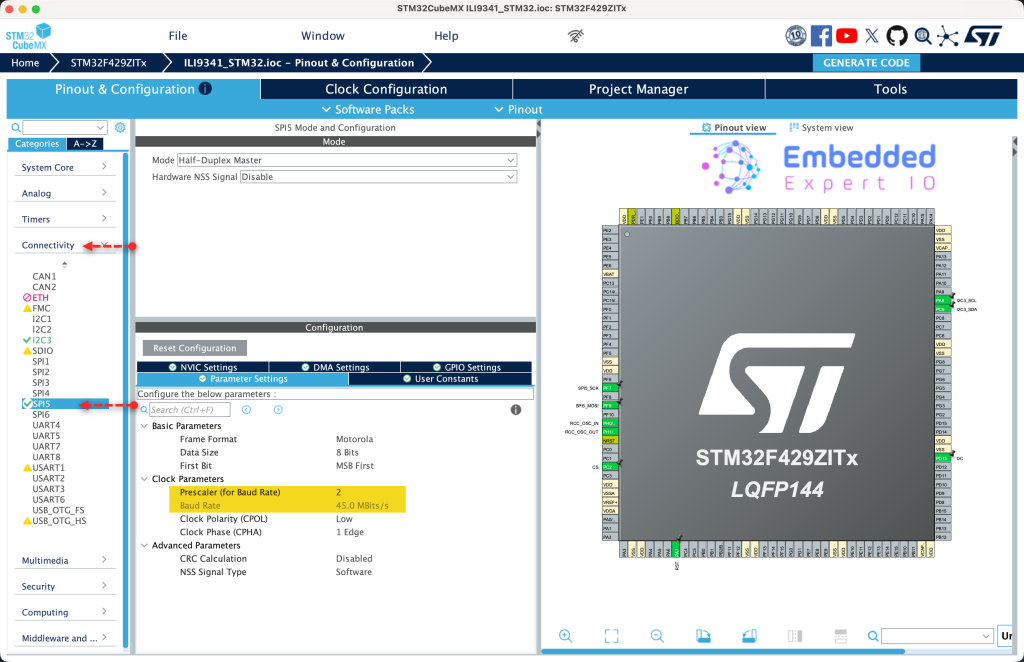
Open the project .ioc file in STM32CubeMX.
From connectivity, select SPI5 and set the orescaler to 2. This will provide 45Mbps transfer speed as follows:
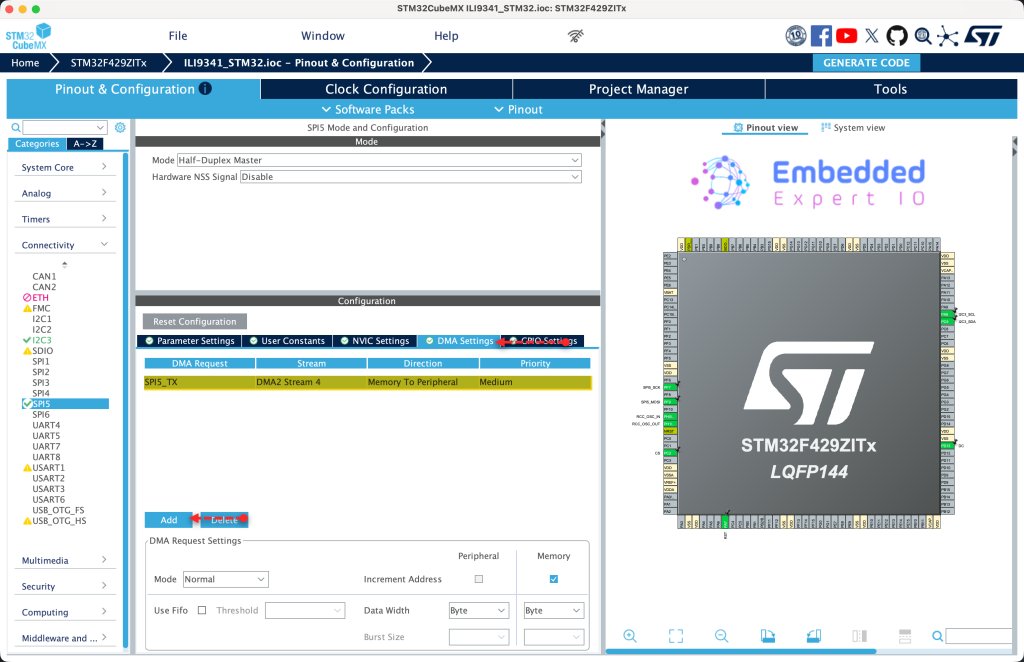
Next, from DMA settings, enable DMA for SPI5_TX as follows:
Finally, enable SPI5 global interrupt and generate code as follows:
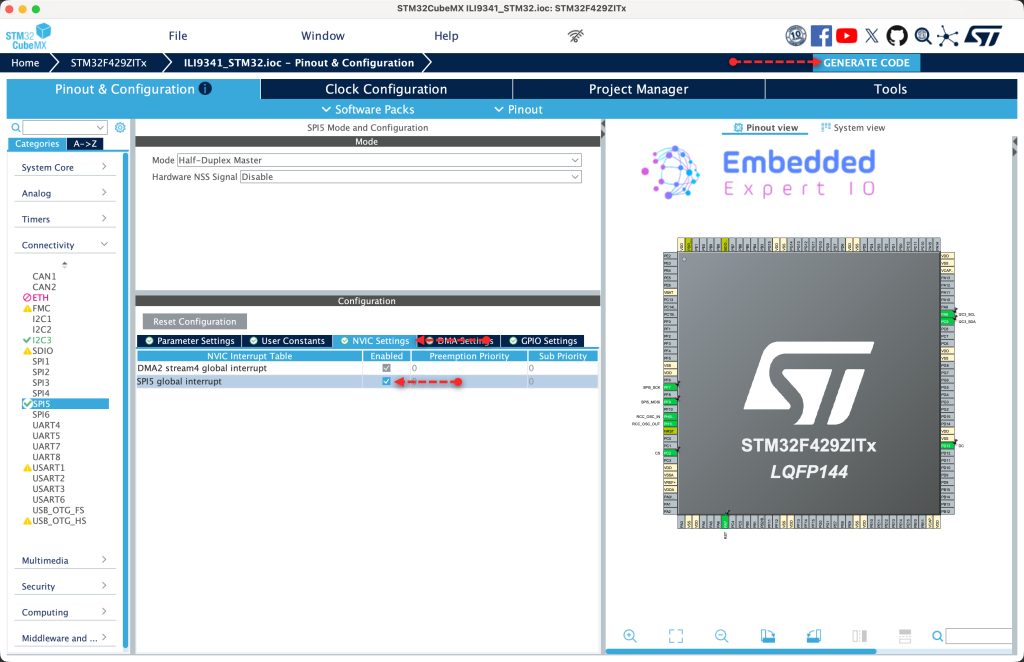
Thats all for the configuration.
2. Firmware Development:
First, head to this github repository and download the latest version as follows:
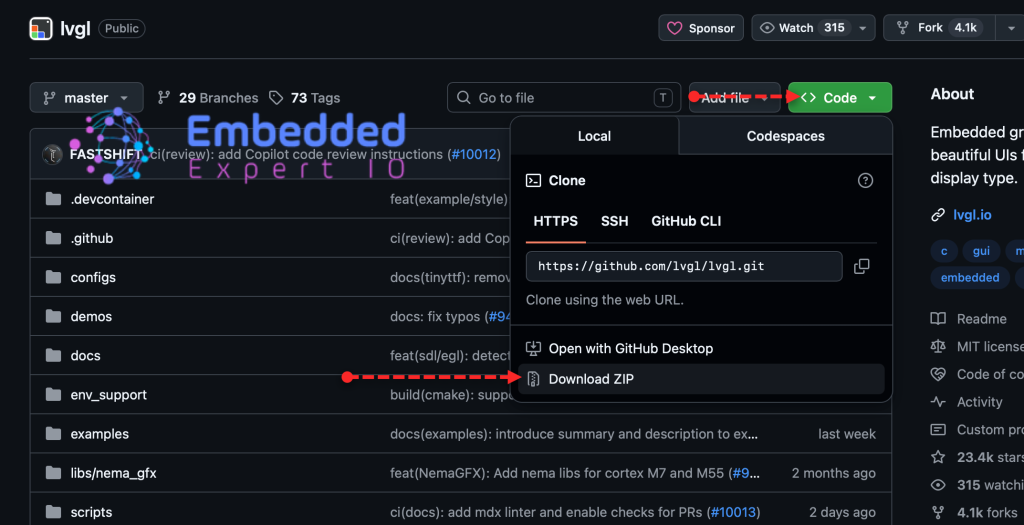
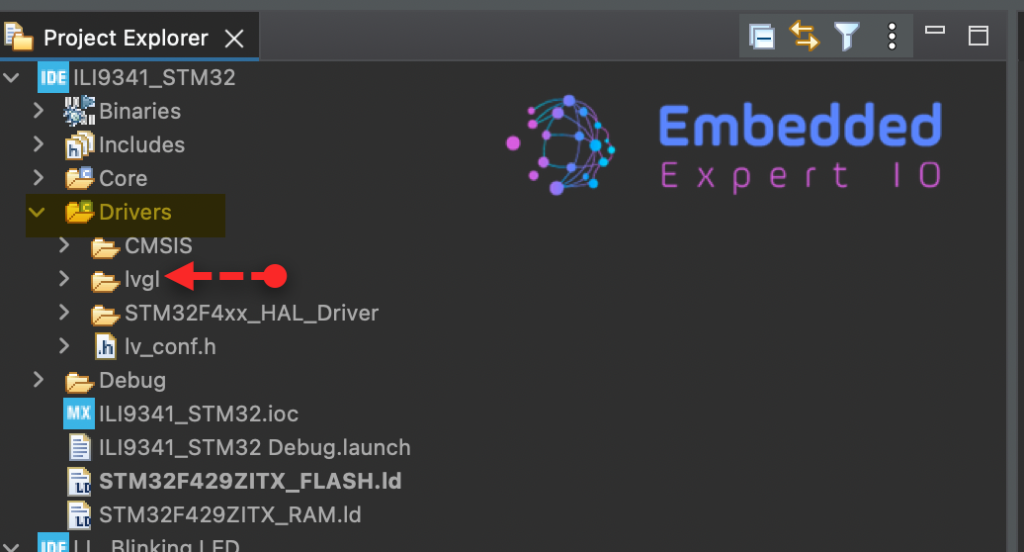
Once downloaded, extract it and rename it simply, lvgl and added to drivers folders as follows:
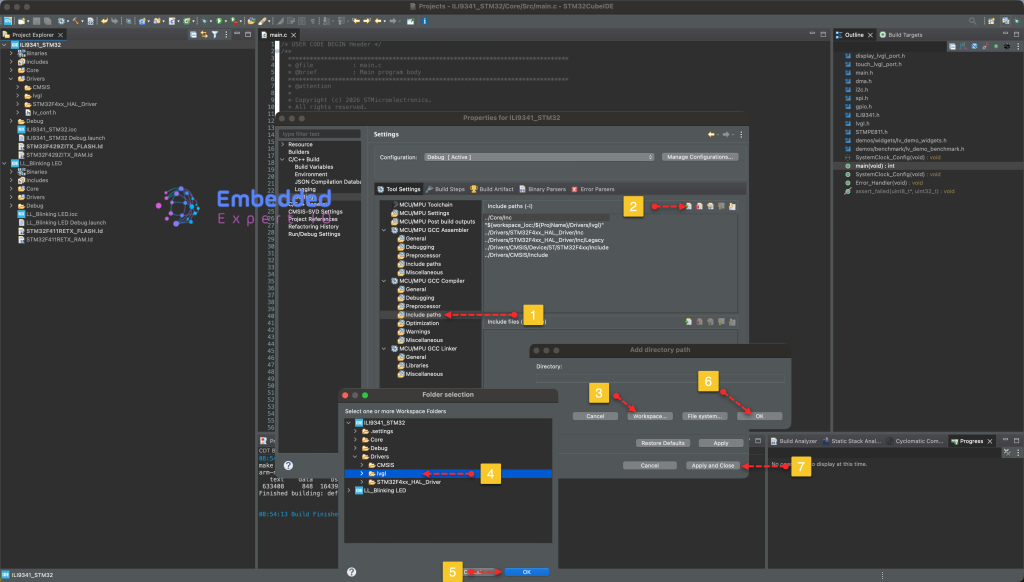
Next, we shall add LvGL folder to the build process.
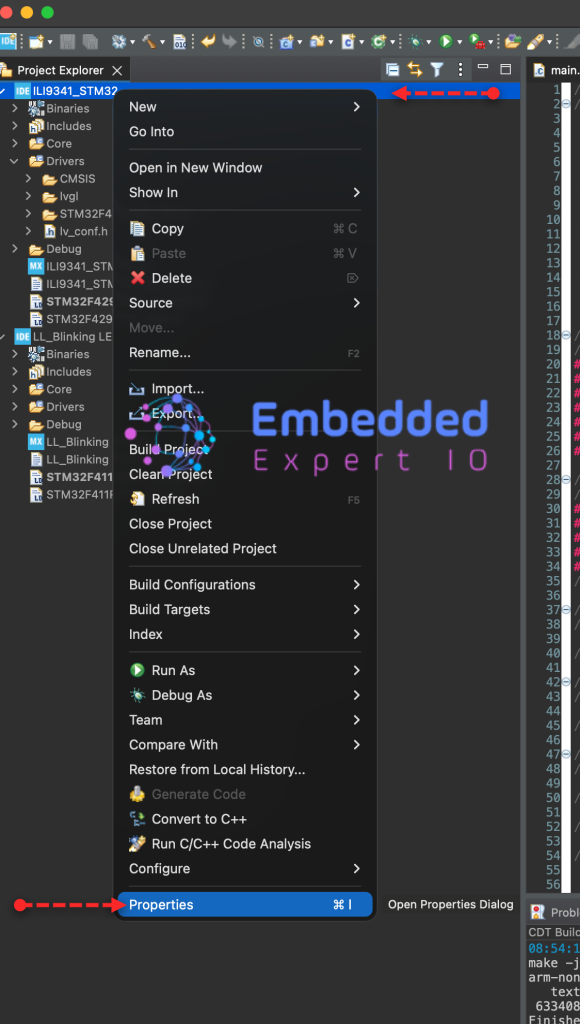
Right click on the project from project explorer and click on properties as follows:
From MCU/MPU GCC compiler, include LvGL path as follows:
Now, we are ready to develop the firmware.
First, in driver folders, create new header file with name of lv_conf.h as follows:
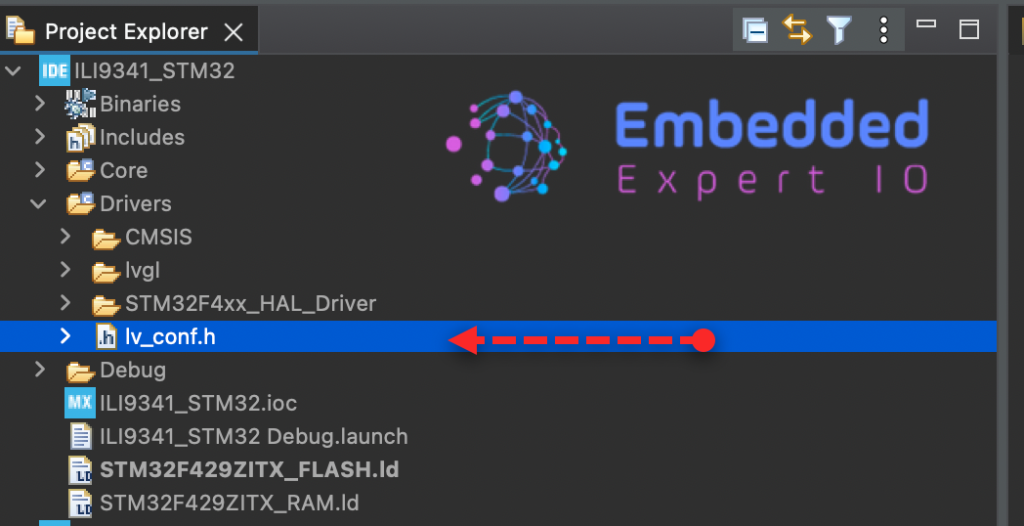
Copy the content of the following header file from this repository.
Once it has been copied, modify the following. First, enable it by setting #if to 1 as follows:
#if 1
By default, the color is set to RGB565, which is the correct one for our display.
#define LV_COLOR_DEPTH 16
Next, enable the demos as follows:
#define LV_BUILD_DEMOS 1
Enable the widget demo as follows:
#define LV_USE_DEMO_WIDGETS 1
Thats all for the lv_conf.h.
Related course
Understand the LVGL port beneath the interface
Continue from LVGL configuration to display-port architecture, layered STM32 firmware and DMA-based framebuffer transfer. The course develops the display path and flush callback, with supporting concepts for styling, events and separating interface code from application behavior.
Next, open ILI9341.h and add the following function:
void ILI9341_Draw_Bitmap_DMA(uint16_t Xstart, uint16_t Ystart, uint16_t Xend, uint16_t Yend, const uint8_t *Image);
This function shall use DMA to transfer the pixel data rather than polling mode.
In ILI9341.c source file, add the following function:
void ILI9341_Draw_Bitmap_DMA(uint16_t Xstart, uint16_t Ystart, uint16_t Xend, uint16_t Yend, const uint8_t *Image)
{


	uint32_t size = (Xend - Xstart + 1) * (Yend - Ystart + 1) * 2;


	ILI9341_SetWindow(Xstart,Ystart,Xend,Yend);


	WriteCommand(0x2c);

	CS_Select();

	DC_HIGH();
	HAL_SPI_Transmit_DMA(&hspi5, Image, size);


}
Once the DMA transfer is completed, HAL_SPI_TxCpltCallback will be called.
First, define this function as weak function. This will allow the user to override the function with his code as follows:
__weak void ILI9341_Transfer_Completed(void);
For HAL_SPI_TxCpltCallback:
void HAL_SPI_TxCpltCallback(SPI_HandleTypeDef *hspi)
{
	CS_Deselect();
	ILI9341_Transfer_Completed();


}
Simple, deselect the display and call ILI9341_Transfer_Completed function.
Next, create new source and header files with the following names:
- display_lvgl_port.h
- display_lvgl_port.c
- touch_lvgl_port.h
- touch_lvgl_port.c
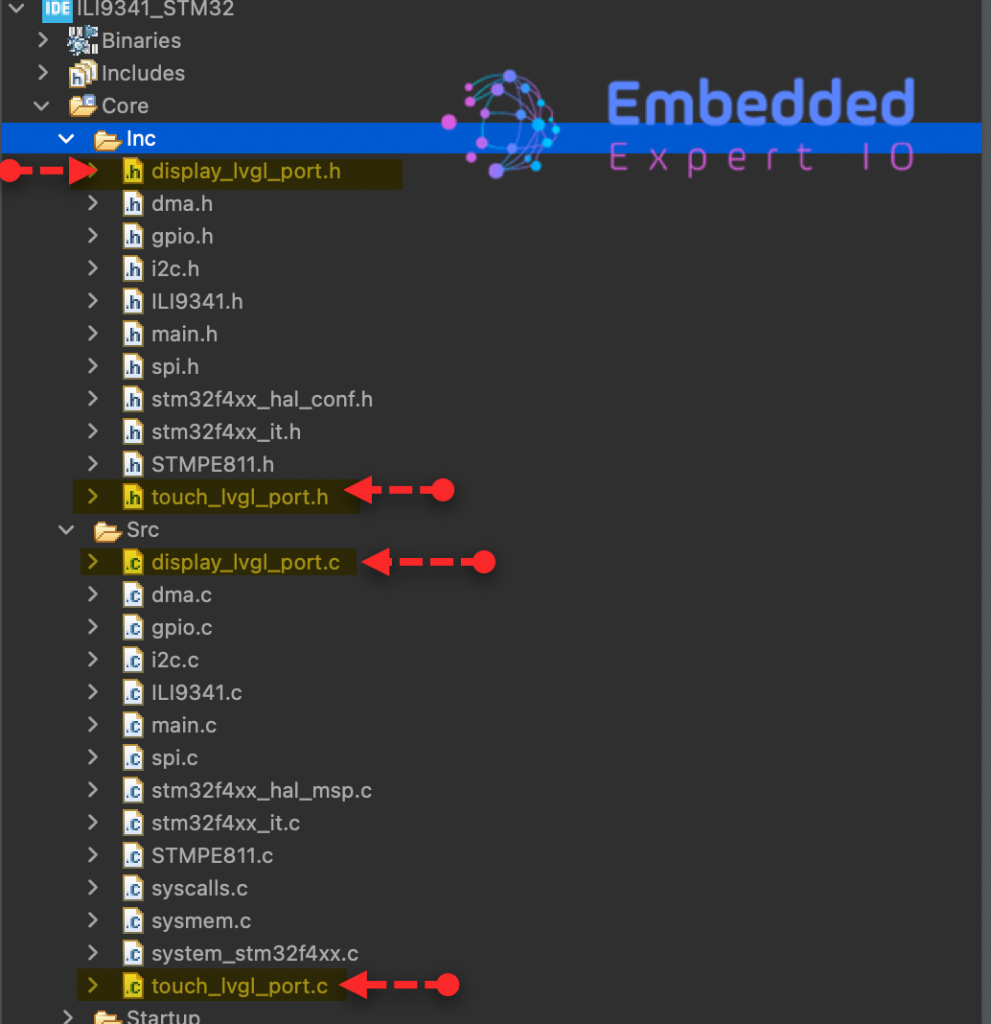
For display_lvgl_port.h, copy the content of the header file in this repository.
Hence, the content of the header file as follows:
#if 1

#ifndef LV_PORT_DISP_TEMPL_H
#define LV_PORT_DISP_TEMPL_H

#ifdef __cplusplus
extern "C" {
#endif

/*********************
 *      INCLUDES
 *********************/

#include "lvgl.h"


/*********************
 *      DEFINES
 *********************/

/**********************
 *      TYPEDEFS
 **********************/

/**********************
 * GLOBAL PROTOTYPES
 **********************/
/* Initialize low level display driver */
void lv_port_disp_init(void);

/* Enable updating the screen (the flushing process) when disp_flush() is called by LVGL
 */
void disp_enable_update(void);

/* Disable updating the screen (the flushing process) when disp_flush() is called by LVGL
 */
void disp_disable_update(void);

/**********************
 *      MACROS
 **********************/

#ifdef __cplusplus
} /*extern "C"*/
#endif

#endif /*LV_PORT_DISP_TEMPL_H*/

#endif /*Disable/Enable content*/
Next, for display_lvgl_port.c source file:
#if 1

/*********************
 *      INCLUDES
 *********************/
#include <display_lvgl_port.h>
#include <stdbool.h>

#include "ILI9341.h"


#define MY_DISP_HOR_RES    240
#define MY_DISP_VER_RES    320

static uint8_t buf_2_1[240*32*2]__attribute__((aligned(4)));;
static uint8_t buf_2_2[240*32*2]__attribute__((aligned(4)));;

lv_display_t  *disp;

/*********************
 *      DEFINES
 *********************/

/**********************
 *      TYPEDEFS
 **********************/

/**********************
 *  STATIC PROTOTYPES
 **********************/
static void disp_init(void);

static void disp_flush(lv_display_t * disp, const lv_area_t * area, uint8_t * px_map);

/**********************
 *  STATIC VARIABLES
 **********************/

/**********************
 *      MACROS
 **********************/

/**********************
 *   GLOBAL FUNCTIONS
 **********************/

void lv_port_disp_init(void)
{
    /*-------------------------
     * Initialize your display
     * -----------------------*/
    disp_init();

    /*------------------------------------
     * Create a display and set a flush_cb
     * -----------------------------------*/
     disp = lv_display_create(MY_DISP_HOR_RES, MY_DISP_VER_RES);
    lv_display_set_flush_cb(disp, disp_flush);


    lv_display_set_buffers(disp, buf_2_1, buf_2_2, sizeof(buf_2_1), LV_DISPLAY_RENDER_MODE_PARTIAL);
    // Change the color format to RGB565_SWAPPED
    lv_display_set_color_format(disp, LV_COLOR_FORMAT_RGB565_SWAPPED);


}

/**********************
 *   STATIC FUNCTIONS
 **********************/

/*Initialize your display and the required peripherals.*/
static void disp_init(void)
{
	ILI9341_Init(ROTATE_0);
}

volatile bool disp_flush_enabled = true;

/* Enable updating the screen (the flushing process) when disp_flush() is called by LVGL
 */
void disp_enable_update(void)
{
    disp_flush_enabled = true;
}

/* Disable updating the screen (the flushing process) when disp_flush() is called by LVGL
 */
void disp_disable_update(void)
{
    disp_flush_enabled = false;
}

/*Flush the content of the internal buffer the specific area on the display.
 *`px_map` contains the rendered image as raw pixel map and it should be copied to `area` on the display.
 *You can use DMA or any hardware acceleration to do this operation in the background but
 *'lv_display_flush_ready()' has to be called when it's finished.*/
static void disp_flush(lv_display_t * disp_drv, const lv_area_t * area, uint8_t * px_map)
{
	if(disp_flush_enabled)
	    {
	        // Simply pass the area coordinates directly to your DMA function
	        ILI9341_Draw_Bitmap_DMA(area->x1, area->y1, area->x2, area->y2, px_map);
	    }
	    else
	    {
	        // If flushing is disabled, we must still inform LVGL to prevent a deadlock
	        lv_display_flush_ready(disp_drv);
	    }

}

void ILI9341_Transfer_Completed(void)
{
	lv_display_flush_ready(disp);
}

#else /*Enable this file at the top*/

/*This dummy typedef exists purely to silence -Wpedantic.*/
typedef int keep_pedantic_happy;
#endif
For touch_lvgl_port.h header file:
#if 1

#ifndef LV_PORT_INDEV_TEMPL_H
#define LV_PORT_INDEV_TEMPL_H

#ifdef __cplusplus
extern "C" {
#endif

/*********************
 *      INCLUDES
 *********************/

#include "lvgl.h"


/*********************
 *      DEFINES
 *********************/

/**********************
 *      TYPEDEFS
 **********************/

/**********************
 * GLOBAL PROTOTYPES
 **********************/
void lv_port_indev_init(void);

/**********************
 *      MACROS
 **********************/

#ifdef __cplusplus
} /*extern "C"*/
#endif

#endif /*LV_PORT_INDEV_TEMPL_H*/

#endif /*Disable/Enable content*/
Next, for touch_lvgl_port.c source file:
#if 1

/*********************
 *      INCLUDES
 *********************/
#include <touch_lvgl_port.h>

#include "STMPE811.h"

/*********************
 *      DEFINES
 *********************/

/**********************
 *      TYPEDEFS
 **********************/

/**********************
 *  STATIC PROTOTYPES
 **********************/

static void touchpad_init(void);
static void touchpad_read(lv_indev_t * indev, lv_indev_data_t * data);
static bool touchpad_is_pressed(void);
static void touchpad_get_xy(int32_t * x, int32_t * y);


/**********************
 *  STATIC VARIABLES
 **********************/
lv_indev_t * indev_touchpad;

/**********************
 *      MACROS
 **********************/

/**********************
 *   GLOBAL FUNCTIONS
 **********************/

void lv_port_indev_init(void)
{
    /**
     * Here you will find example implementation of input devices supported by LittelvGL:
     *  - Touchpad
     *  - Mouse (with cursor support)
     *  - Keypad (supports GUI usage only with key)
     *  - Encoder (supports GUI usage only with: left, right, push)
     *  - Button (external buttons to press points on the screen)
     *
     *  The `..._read()` function are only examples.
     *  You should shape them according to your hardware
     */

    /*------------------
     * Touchpad
     * -----------------*/

    /*Initialize your touchpad if you have*/
    touchpad_init();

    /*Register a touchpad input device*/
    indev_touchpad = lv_indev_create();
    lv_indev_set_type(indev_touchpad, LV_INDEV_TYPE_POINTER);
    lv_indev_set_read_cb(indev_touchpad, touchpad_read);


}

/**********************
 *   STATIC FUNCTIONS
 **********************/

/*------------------
 * Touchpad
 * -----------------*/

/*Initialize your touchpad*/
static void touchpad_init(void)
{
	STMPE811_Touch_Enable();
}

/*Will be called by the library to read the touchpad*/
static void touchpad_read(lv_indev_t * indev_drv, lv_indev_data_t * data)
{
    static int32_t last_x = 0;
    static int32_t last_y = 0;

    /*Save the pressed coordinates and the state*/
    if(touchpad_is_pressed()) {
        touchpad_get_xy(&last_x, &last_y);
        data->state = LV_INDEV_STATE_PRESSED;
    }
    else {
        data->state = LV_INDEV_STATE_RELEASED;
    }

    /*Set the last pressed coordinates*/
    data->point.x = last_x;
    data->point.y = last_y;
}

/*Return true is the touchpad is pressed*/
static bool touchpad_is_pressed(void)
{
	if (isTouched()==touched)
	{
		return true;
	}

	else
	{
		return false;
	}
}

/*Get the x and y coordinates if the touchpad is pressed*/
static void touchpad_get_xy(int32_t * x, int32_t * y)
{
	uint16_t X,Y;
	getTouchValue(&X, &Y);

	*x=X;
	*y=320-Y;


}

#endif
Thats all for the porting process.
Next, open main.c file.
We start by including the following header files:
#include "lvgl.h"
#include <display_lvgl_port.h>
#include <touch_lvgl_port.h>
#include "demos/widgets/lv_demo_widgets.h"
Next, in main function.
First, initialize lvgl:
lv_init();
attach HAL_GetTick to lv_tick_set_cb as follows:
lv_tick_set_cb(HAL_GetTick);
Intialize the display and touch as follows:
lv_port_disp_init();
lv_port_indev_init();
In while 1 loop:
Call lv_timer_handler each 5ms as follows
lv_timer_handler();
HAL_Delay(5);
Save, build the project and run it as follows:

You may download the code from this github repository.
3. Results:
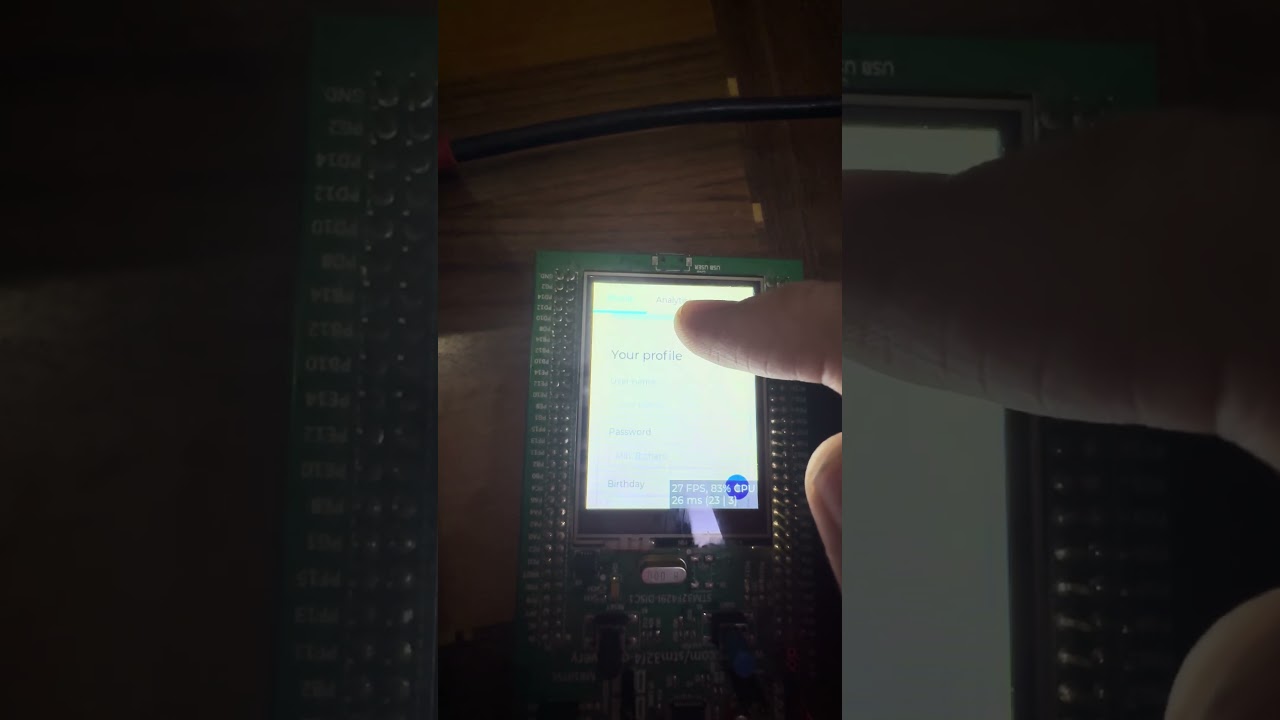
LvGL V9.5 on STM32F429 Discovery
Hosted by YouTube. Playing may use YouTube cookies. Privacy details
Happy coding 😉
Discussion