

In this guide, we shall see how to add ARM Complier V5 to keil uvision IDE.
The issue is that Keil has removed ARM Compiler V5 from the IDE and start to offered as add on.

To solve this issue, head to ARM download center from here.
Scroll down and ACOMP5 as shown in this picture:

It will ask you to login or create new account, do this with your own information.
After successfully logged in, repeat the step above and you should see this page when you hot ACOMP5:

Select windows version and hit download now and the download shall begin.
After download, follow this youtube tutorial for how to install the pack:

ARM Compiler V5 installation for Keil Uvision
Hosted by YouTube. Playing may use YouTube cookies. Privacy details
Then open keil uVision and follow this video:
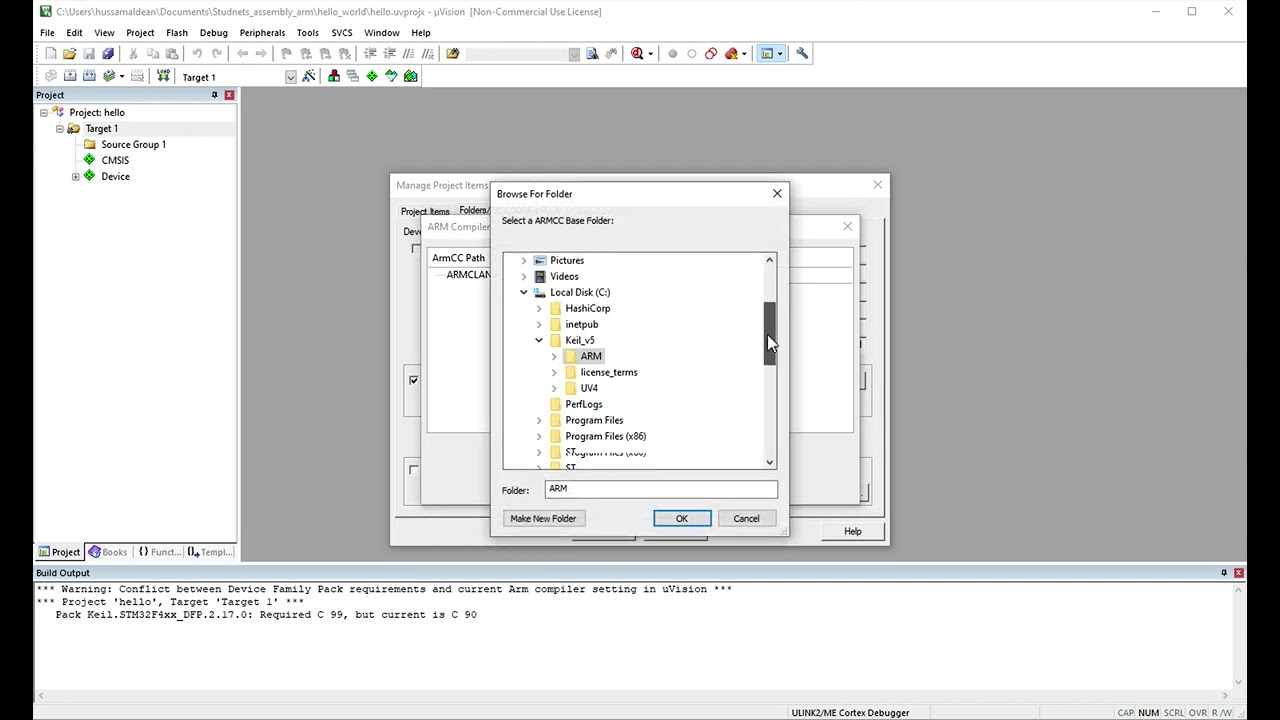
Adding ARM Compiler V5 to keil uVision
Hosted by YouTube. Playing may use YouTube cookies. Privacy details
Now, you can do your project in ARM Compiler V5.
from where i will get the compiler 5 license
Take a look at MDK v6:
https://community.arm.com/arm-community-blogs/b/tools-software-ides-blog/posts/mdk-v6-released
If you need the license, contact keil for that matter.
getting this error
Error: C9555E: Failed to check out a license.
Hi,
the newer version of Keil requires license.