

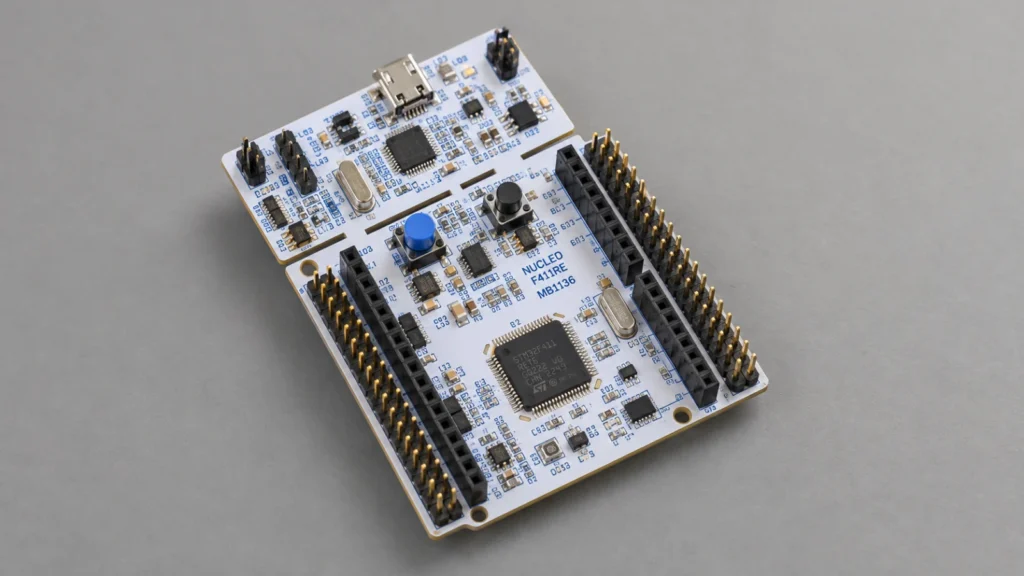
In this 15th part of board support package, we shall develop timer driver that will overflow each 1 second and toggle LED accordingly.
In this guide, we shall cover the following:
- Developing the header file.
- Developing the source file.
- Main code.
- Results.
1. Developing the header file:
We start off by creating new header file with name of tim_bsp.h.
Within the header file:
Include the header guard as following:
#ifndef TIM_BSP_H_
#define TIM_BSP_H_


#endif /* TIM_BSP_H_ */
Within the header guard, include the following header files:
#include "stm32f4xx.h"
#include "stdint.h"
We need the main stm32f4xx header file and stdint library to handle data types of uint32_t.
Since STM32F411 has multiple timers as shown below:
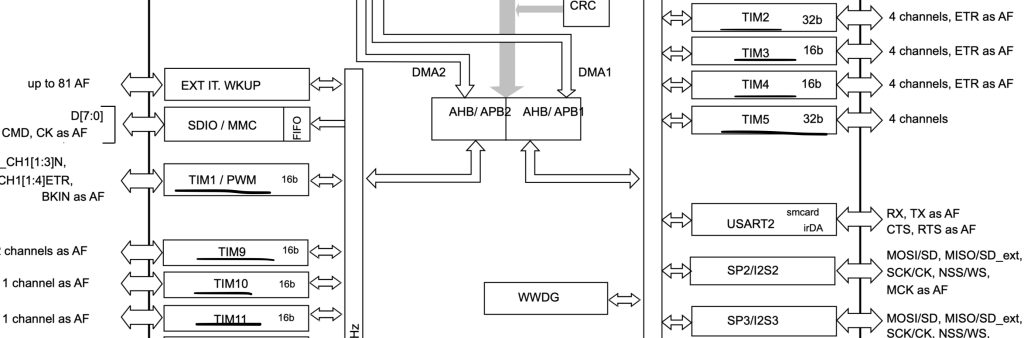
We shall create macros for enabling clock for each timer as following:
/*APB2 Timers*/
#define __BSP_TIM1_CLK_ENABLE()			RCC->APB2ENR|=RCC_APB2ENR_TIM1EN
#define __BSP_TIM9_CLK_ENABLE()			RCC->APB2ENR|=RCC_APB2ENR_TIM9EN
#define __BSP_TIM10_CLK_ENABLE()		RCC->APB2ENR|=RCC_APB2ENR_TIM10EN
#define __BSP_TIM11_CLK_ENABLE()		RCC->APB2ENR|=RCC_APB2ENR_TIM11EN

/*APB1 Timers*/
#define __BSP_TIM2_CLK_ENABLE()			RCC->APB1ENR|=RCC_APB1ENR_TIM2EN
#define __BSP_TIM3_CLK_ENABLE()			RCC->APB1ENR|=RCC_APB1ENR_TIM3EN
#define __BSP_TIM4_CLK_ENABLE()			RCC->APB1ENR|=RCC_APB1ENR_TIM4EN
#define __BSP_TIM5_CLK_ENABLE()			RCC->APB1ENR|=RCC_APB1ENR_TIM5EN
Since we are interested in the checking if the timer has elapsed or not, we shall declare an enum to handle this as following:
typedef enum
{
	Counting=0,
	Elapsed=1

}Timer_Update_StatusTypedef;
You have two states:
- Counting which means the timer has not yet elapsed.
- Elapsed which means the timer has overflow and started over again.
Declare the following function:
void BSP_TIM_Start_Basic(TIM_TypeDef *tim, uint16_t prescaler, uint32_t max_value);
The function shall start the timer in basic mode as counter. The functions takes the three argument as following:
- TIM_Typedef to indicate which timer to be used.
- Prescaler to set the prescaler value.
- max_value to set the maximum value of the timer by setting the ARR value.
And the function shall return nothing.
The second function:
Timer_Update_StatusTypedef BSP_TIM_Elapsed(TIM_TypeDef *tim);
This function will return the status of either counting or elapsed and take TIM_Typedef as argument.
Third function as following:
void BSP_TIM_Stop(TIM_TypeDef *tim);
This function will stop the timer and it takes TIM_Typedef as argument and returns nothing.
Hence, the entire header file as following:
#ifndef TIM_BSP_H_
#define TIM_BSP_H_

#include "stm32f4xx.h"
#include "stdint.h"

/*APB2 Timers*/
#define __BSP_TIM1_CLK_ENABLE()			RCC->APB2ENR|=RCC_APB2ENR_TIM1EN
#define __BSP_TIM9_CLK_ENABLE()			RCC->APB2ENR|=RCC_APB2ENR_TIM9EN
#define __BSP_TIM10_CLK_ENABLE()		RCC->APB2ENR|=RCC_APB2ENR_TIM10EN
#define __BSP_TIM11_CLK_ENABLE()		RCC->APB2ENR|=RCC_APB2ENR_TIM11EN

/*APB1 Timers*/
#define __BSP_TIM2_CLK_ENABLE()			RCC->APB1ENR|=RCC_APB1ENR_TIM2EN
#define __BSP_TIM3_CLK_ENABLE()			RCC->APB1ENR|=RCC_APB1ENR_TIM3EN
#define __BSP_TIM4_CLK_ENABLE()			RCC->APB1ENR|=RCC_APB1ENR_TIM4EN
#define __BSP_TIM5_CLK_ENABLE()			RCC->APB1ENR|=RCC_APB1ENR_TIM5EN


typedef enum
{
	Counting=0,
	Elapsed=1

}Timer_Update_StatusTypedef;


void BSP_TIM_Start_Basic(TIM_TypeDef *tim, uint16_t prescaler, uint32_t max_value);

Timer_Update_StatusTypedef BSP_TIM_Elapsed(TIM_TypeDef *tim);

void BSP_TIM_Stop(TIM_TypeDef *tim);

#endif /* TIM_BSP_H_ */
2. Developing the source file:
We start off by creating new source file with name of tim_bsp.c file.
Within the source file, include the following header file:
#include "tim_bsp.h"
Now, we shall populate the functions:
For the timer start in basic mode:
void BSP_TIM_Start_Basic(TIM_TypeDef *tim, uint16_t prescaler, uint32_t max_value)
{
	tim->PSC=prescaler;
	tim->ARR=max_value;
	tim->CNT=0;
	tim->CR1|=TIM_CR1_CEN;
}
For timer if elapsed or not:
Timer_Update_StatusTypedef BSP_TIM_Elapsed(TIM_TypeDef *tim)
{
	if ((tim->SR & TIM_SR_UIF)==TIM_SR_UIF)
	{
		tim->SR &=~(1<<TIM_SR_UIF_Pos);
		return Elapsed;
	}

	else
	{
		return Counting;
	}
}
For timer stop:
void BSP_TIM_Stop(TIM_TypeDef *tim)
{
	tim->CR1&=~TIM_CR1_CEN;
}
Hence, the entire source file as following:
#include "tim_bsp.h"

void BSP_TIM_Start_Basic(TIM_TypeDef *tim, uint16_t prescaler, uint32_t max_value)
{
	tim->PSC=prescaler;
	tim->ARR=max_value;
	tim->CNT=0;
	tim->CR1|=TIM_CR1_CEN;
}

Timer_Update_StatusTypedef BSP_TIM_Elapsed(TIM_TypeDef *tim)
{
	if ((tim->SR & TIM_SR_UIF)==TIM_SR_UIF)
	{
		tim->SR &=~(1<<TIM_SR_UIF_Pos);
		return Elapsed;
	}

	else
	{
		return Counting;
	}
}

void BSP_TIM_Stop(TIM_TypeDef *tim)
{
	tim->CR1&=~TIM_CR1_CEN;
}
Related course
Follow elapsed periods into other timer uses
The start, elapsed-status and stop operations now form a small timer service. Continue with the course to study timer configuration and extend into compare, capture and interrupt drivers. The curriculum connects this polling example with other ways to use STM32F4 general-purpose timers.
3. Main code:
Within main.c file:
#include "bsp.h"
#include "tim_bsp.h"

void clock_config(void);

GPIO_Output_Typedef PA5_LED;

int main()
{


	#if FPU_EN
		SCB->CPACR |= ((3UL << 10*2)|(3UL << 11*2));
	#endif

	clock_config();

	BSP_Ticks_Init(100000000);

	GPIO_Configure_Typedef PA5_LED_Config;

	GPIOA_CLOCK_ENABLE();

	PA5_LED_Config.PinNumber=pin5;

	PA5_LED_Config.Mode=OUTPUT;

	PA5_LED.pinNumber=pin5;

	GPIO_Initialization(GPIOA,&PA5_LED_Config);

	__BSP_TIM2_CLK_ENABLE();

	BSP_TIM_Start_Basic(TIM2,10000,10000);


	while(1)
	{
		if(BSP_TIM_Elapsed(TIM2)==Elapsed)
		{
			GPIO_TogglePin(GPIOA,&PA5_LED);
		}

	}
}

void clock_config(void)
{
	Clock_Config_Typedef clockConfig;

	clockConfig.PLL_M= 4;
	clockConfig.PLL_N= 200;
	clockConfig.PLL_P= 4;

	clockConfig.AHB1Prescaler=AHB1_Prescaler1;
	clockConfig.APB1Prescaler=APB1_Prescaler2;
	clockConfig.APB2Prescaler=APB2_Prescaler1;

	clockConfig.clockSourc=External_Oscillator;
	clockConfig.flash_latency= Three_wait_state;

	Clock_Configuration(&clockConfig);
}
Since the SMT32F411 is set to run at 100MHz and the APB2 is running at 100MHz, we used prescaller of 10000 and max value of 10000 which will give us 1 second toggle rate.
4. Results:
After uploading the code, you should get the following results:

Board Support Pack of STM32F411: Core Configuration
Hosted by YouTube. Playing may use YouTube cookies. Privacy details
Happy coding 🙂

Thank you. That’s a lot of work you’ve done. I’ve learnt a lot. Looking forward to the sequel. Timers are particularly interesting, especially the complex modes of setting them up.
Wait for advanced section of timers in upcoming weeks.