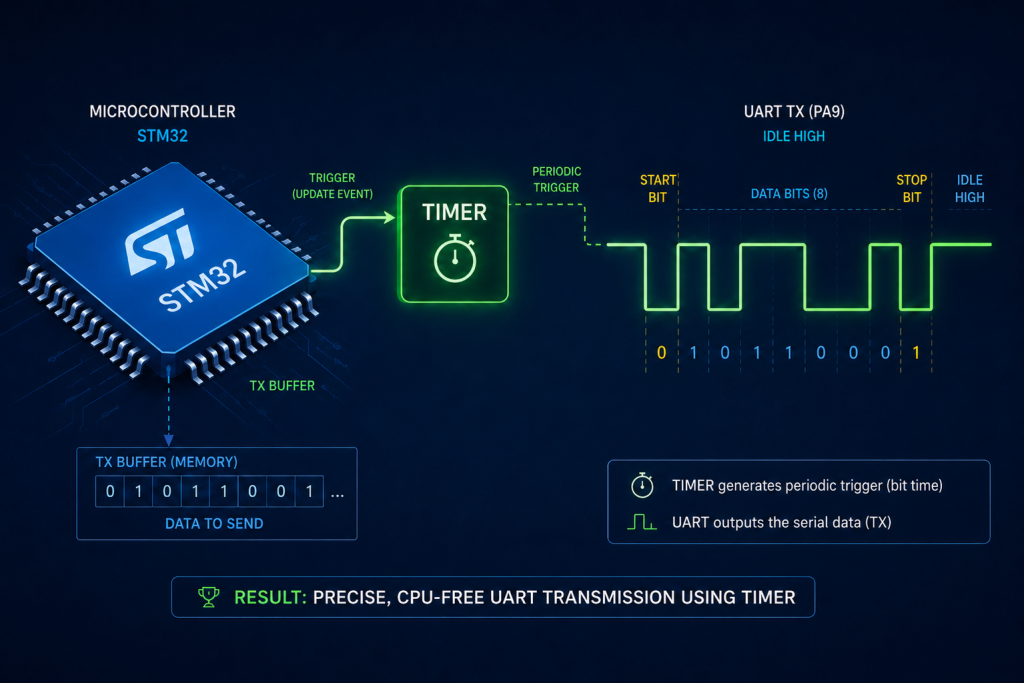
With the timer and GPIO successfully configured, we will now shift our focus to actively transmitting data. By leveraging the TIM3 interrupt, the microcontroller will autonomously shift bits out to the TX pin, ensuring precise baud rate generation without stalling the main loop.
In this guide, we shall cover the following:
- Firmware Development.
- Results.
1. Firmware Development:
We start by creating new header and source file with name of soft_uart.h and soft_uart.c respectively.
To create the header file, right click on inc folder, and select new, header file as follows:
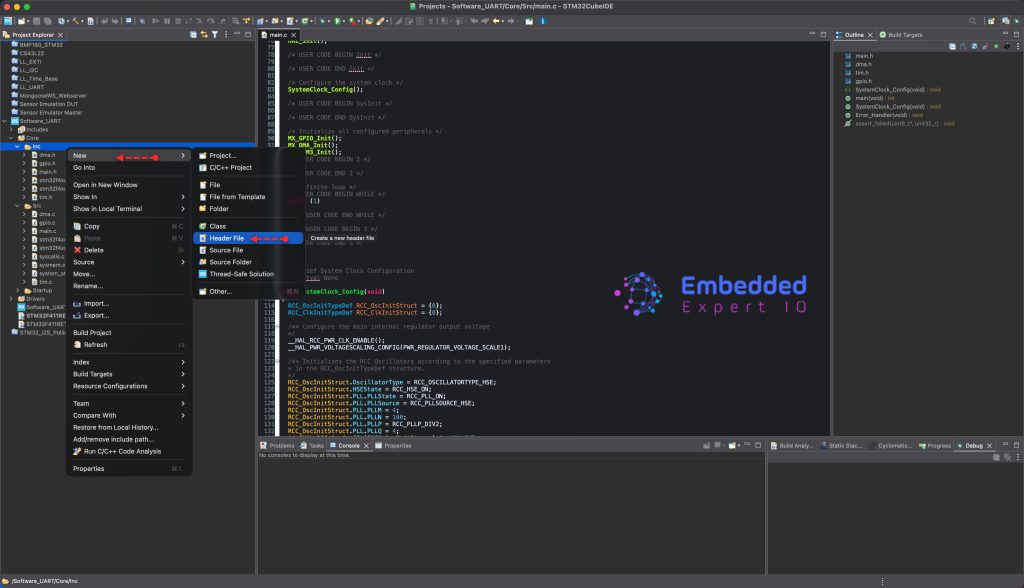
Give it a name soft_uart.h and click on Finish.
To create new source file, right click on src folder, new and Source file as follows:
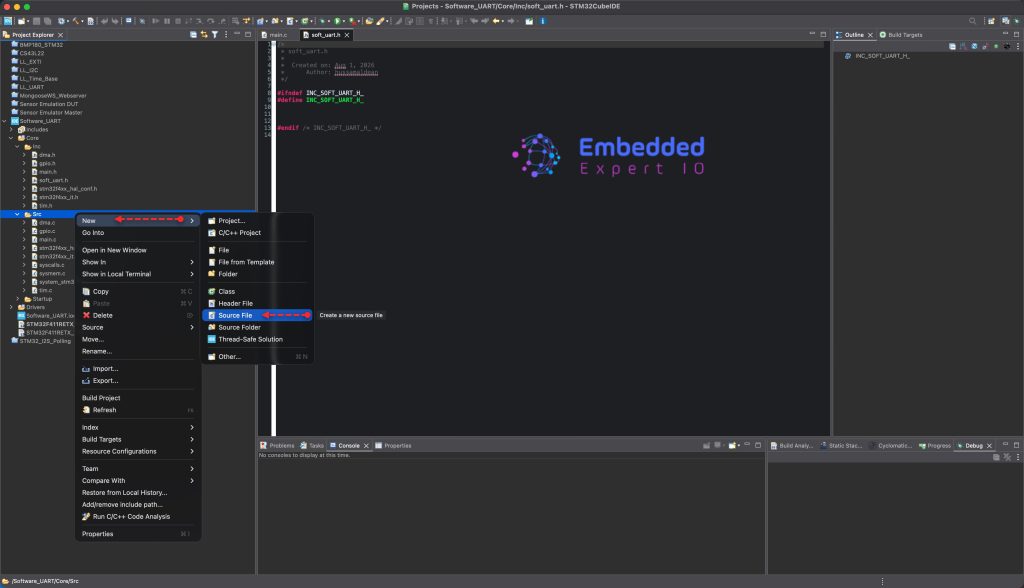
Give it soft_uart.c as a name and click on Finish.
Next, open the soft_uart.h header file.
We start by including the following header files:
#include "stm32f4xx_hal.h"
#include <stdint.h>
#include <stdbool.h>
#include "tim.h"
We include the main stm32g4xx_hal header file along side tim.h for the timer.
We also include stdint.h and stdbool to handle uint and bool respectively.
Next, define the baudrate the timer frequency:
#define SOFT_UART_BAUDRATE         115200U
#define SOFT_UART_TIM_CLOCK_HZ     100000000UL
Calculate the ticks per bit for the UART:
#define SOFT_UART_TICKS_PER_BIT   ((SOFT_UART_TIM_CLOCK_HZ + (SOFT_UART_BAUDRATE / 2U)) \
                                   / SOFT_UART_BAUDRATE)
This can be changed later in case you need like 9600bps.
Next, define the TX buffer size (depending on your application):
#define SOFT_UART_TX_BUF_SIZE 128U
Next define the following functions:
void SoftUART_Init(void);
This function shall initialize the soft UART.
Next,
void SoftUART_SendByte(uint8_t data);
This will allow you to send single byte over soft uart.
Next,
void SoftUART_SendBuffer(const uint8_t *data, uint32_t len);
This will send a buffer.
void SoftUART_SendString(const char *str);
This will send a string.
Finally,
bool SoftUART_IsBusy(void);
This will be used to inform your firmware that the UART finished transmitting all the bytes.
Hence, the header file:
/* soft_uart.h — Software UART via TIM3 Interrupt */
#ifndef SOFT_UART_H
#define SOFT_UART_H

#include "stm32f4xx_hal.h"
#include <stdint.h>
#include <stdbool.h>
#include "tim.h"
/* ===================== User Configuration ===================== */

#define SOFT_UART_BAUDRATE         115200U
#define SOFT_UART_TIM_CLOCK_HZ     100000000UL

/* Timer ticks per UART bit */
#define SOFT_UART_TICKS_PER_BIT   ((SOFT_UART_TIM_CLOCK_HZ + (SOFT_UART_BAUDRATE / 2U)) \
                                   / SOFT_UART_BAUDRATE)

/* TX Buffer Size */
#define SOFT_UART_TX_BUF_SIZE      128U

/* ===================== API ===================== */

void  SoftUART_Init(void);
void  SoftUART_SendByte(uint8_t data);
void  SoftUART_SendBuffer(const uint8_t *data, uint32_t len);
void  SoftUART_SendString(const char *str);
bool  SoftUART_IsBusy(void);

#endif /* SOFT_UART_H */
Next, open soft_uart.c source file.
We start by including the following header files:
#include "soft_uart.h"
#include "main.h"
Next, declare the following private variables:
static volatile uint8_t  tx_buffer[SOFT_UART_TX_BUF_SIZE];
static volatile uint16_t tx_head = 0;  /* Where new data is added */
static volatile uint16_t tx_tail = 0;  /* What the ISR is currently sending */

static volatile uint8_t  tx_shift_reg = 0;
static volatile uint8_t  tx_bit_count = 0;
static volatile bool     tx_busy = false;
Next, for UART initialization, simply, set the TX pin to high as follows:
void SoftUART_Init(void)
{
    /* Ensure PA6 is High (Idle state) */
    HAL_GPIO_WritePin(soft_tx_GPIO_Port, soft_tx_Pin, GPIO_PIN_SET);
}
Next, send single byte:
void SoftUART_SendByte(uint8_t data)
{
    /* Calculate next head index */
    uint16_t next_head = (tx_head + 1U) % SOFT_UART_TX_BUF_SIZE;

    /* Wait if buffer is full */
    while (next_head == tx_tail) { __WFE(); }

    /* Disable interrupt temporarily to safely update the buffer */
    __disable_irq();
    tx_buffer[tx_head] = data;
    tx_head = next_head;
    __enable_irq();

    /* Start the timer if it's not already running */
    if (!tx_busy)
    {
        tx_busy = true;
        htim3.Instance->CNT = 0;
        HAL_TIM_Base_Start_IT(&htim3);
    }
}
Send buffer and string:
void SoftUART_SendBuffer(const uint8_t *data, uint32_t len)
{
    for (uint32_t i = 0; i < len; i++)
    {
        SoftUART_SendByte(data[i]);
    }
}

void SoftUART_SendString(const char *str)
{
    while (*str)
    {
        SoftUART_SendByte((uint8_t)*str++);
    }
}
Next, soft iart is busy function:
bool SoftUART_IsBusy(void)
{
    return tx_busy;
}
Next, timer 3 interrupt handler. This is where the magic happens:
void TIM3_IRQHandler(void)
{
    /* Clear the update interrupt flag manually (bypass HAL overhead) */
    TIM3->SR = ~TIM_SR_UIF;

    if (tx_bit_count == 0)
    {
        /* Load next byte from the ring buffer */
        if (tx_head != tx_tail)
        {
            tx_shift_reg = tx_buffer[tx_tail];
            tx_tail = (tx_tail + 1U) % SOFT_UART_TX_BUF_SIZE;

            /* Send Start Bit (Low) */
            HAL_GPIO_WritePin(soft_tx_GPIO_Port, soft_tx_Pin, GPIO_PIN_RESET);

            tx_bit_count = 1; /* Start processing data bits on next interrupt */
        }
        else
        {
            /* Buffer empty: Stop the timer */
            HAL_TIM_Base_Stop_IT(&htim3);
            tx_busy = false;
        }
    }
    else if (tx_bit_count <= 8)
    {
        /* Send Data Bits (LSB first) */
        if (tx_shift_reg & 0x01U)
        {
            HAL_GPIO_WritePin(soft_tx_GPIO_Port, soft_tx_Pin, GPIO_PIN_SET);
        }
        else
        {
            HAL_GPIO_WritePin(soft_tx_GPIO_Port, soft_tx_Pin, GPIO_PIN_RESET);
        }

        tx_shift_reg >>= 1;
        tx_bit_count++;
    }
    else
    {
        /* Send Stop Bit (High) */
        HAL_GPIO_WritePin(soft_tx_GPIO_Port, soft_tx_Pin, GPIO_PIN_SET);
        tx_bit_count = 0; /* Reset for next byte */
    }
}
Flow chart to better understanding:
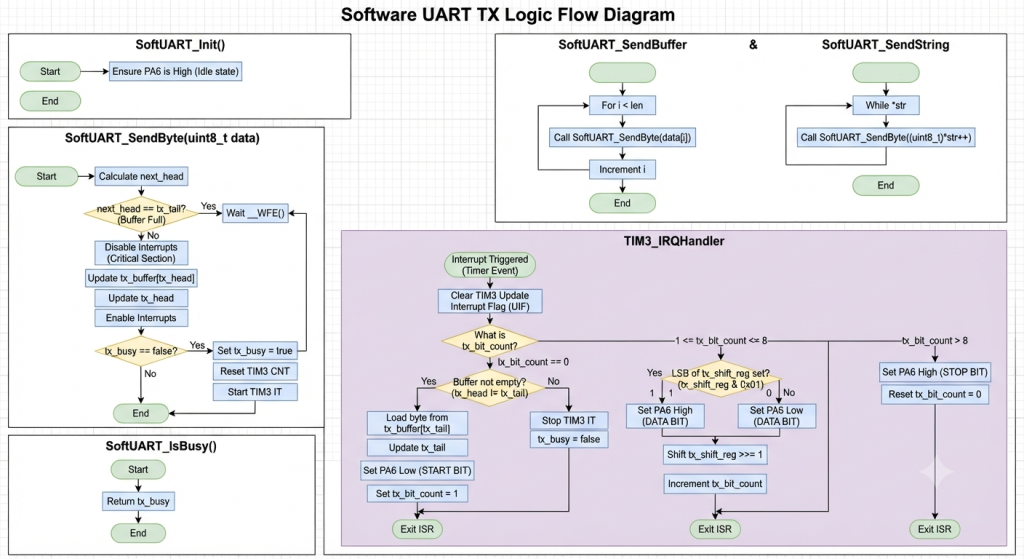
Hence, the source file:
/* soft_uart.c — Software UART via TIM3 Interrupt */

#include "soft_uart.h"
#include "main.h"

/* ===================== Private Variables ===================== */

static volatile uint8_t  tx_buffer[SOFT_UART_TX_BUF_SIZE];
static volatile uint16_t tx_head = 0;  /* Where new data is added */
static volatile uint16_t tx_tail = 0;  /* What the ISR is currently sending */

static volatile uint8_t  tx_shift_reg = 0;
static volatile uint8_t  tx_bit_count = 0;
static volatile bool     tx_busy = false;

/* ===================== Initialization ===================== */

void SoftUART_Init(void)
{
    /* Ensure PA6 is High (Idle state) */
    HAL_GPIO_WritePin(soft_tx_GPIO_Port, soft_tx_Pin, GPIO_PIN_SET);
}

/* ===================== Core TX Logic ===================== */

void SoftUART_SendByte(uint8_t data)
{
    /* Calculate next head index */
    uint16_t next_head = (tx_head + 1U) % SOFT_UART_TX_BUF_SIZE;

    /* Wait if buffer is full */
    while (next_head == tx_tail) { __WFE(); }

    /* Disable interrupt temporarily to safely update the buffer */
    __disable_irq();
    tx_buffer[tx_head] = data;
    tx_head = next_head;
    __enable_irq();

    /* Start the timer if it's not already running */
    if (!tx_busy)
    {
        tx_busy = true;
        htim3.Instance->CNT = 0;
        HAL_TIM_Base_Start_IT(&htim3);
    }
}

void SoftUART_SendBuffer(const uint8_t *data, uint32_t len)
{
    for (uint32_t i = 0; i < len; i++)
    {
        SoftUART_SendByte(data[i]);
    }
}

void SoftUART_SendString(const char *str)
{
    while (*str)
    {
        SoftUART_SendByte((uint8_t)*str++);
    }
}

bool SoftUART_IsBusy(void)
{
    return tx_busy;
}

/* ===================== Interrupt Handler ===================== */

/* Put this function in your stm32f4xx_it.c file,
   or keep it here if you are not using CubeMX's IT file.
   It MUST be named exactly TIM3_IRQHandler. */

void TIM3_IRQHandler(void)
{
    /* Clear the update interrupt flag manually (bypass HAL overhead) */
    TIM3->SR = ~TIM_SR_UIF;

    if (tx_bit_count == 0)
    {
        /* Load next byte from the ring buffer */
        if (tx_head != tx_tail)
        {
            tx_shift_reg = tx_buffer[tx_tail];
            tx_tail = (tx_tail + 1U) % SOFT_UART_TX_BUF_SIZE;

            /* Send Start Bit (Low) */
            HAL_GPIO_WritePin(soft_tx_GPIO_Port, soft_tx_Pin, GPIO_PIN_RESET);

            tx_bit_count = 1; /* Start processing data bits on next interrupt */
        }
        else
        {
            /* Buffer empty: Stop the timer */
            HAL_TIM_Base_Stop_IT(&htim3);
            tx_busy = false;
        }
    }
    else if (tx_bit_count <= 8)
    {
        /* Send Data Bits (LSB first) */
        if (tx_shift_reg & 0x01U)
        {
            HAL_GPIO_WritePin(soft_tx_GPIO_Port, soft_tx_Pin, GPIO_PIN_SET);
        }
        else
        {
            HAL_GPIO_WritePin(soft_tx_GPIO_Port, soft_tx_Pin, GPIO_PIN_RESET);
        }

        tx_shift_reg >>= 1;
        tx_bit_count++;
    }
    else
    {
        /* Send Stop Bit (High) */
        HAL_GPIO_WritePin(soft_tx_GPIO_Port, soft_tx_Pin, GPIO_PIN_SET);
        tx_bit_count = 0; /* Reset for next byte */
    }
}
Next, open main.c source file.
We start by including the following header file:
#include "soft_uart.h"

#include "stdio.h"
In user code begin PV (Private variable), declare the following variables:
uint8_t buffer[SOFT_UART_TX_BUF_SIZE]={0};
uint8_t counter=0;
In user code begin 2 in main function, initialize the software UART:
SoftUART_Init();
In user code begin 3 in while 1 loop:
uint16_t len=snprintf(buffer,SOFT_UART_TX_BUF_SIZE, "counter value = %d \r\n", counter ++);


SoftUART_SendBuffer(buffer,len);
while(SoftUART_IsBusy());


HAL_Delay(10);
We construct a buffer with snprintf and increment the counter.
Send the buffer each 10ms.
Thats all for the guide.
Save, build the project and run it as follows:

You may download the project from here.
2. Results:
By probing PA6, you should get the following:
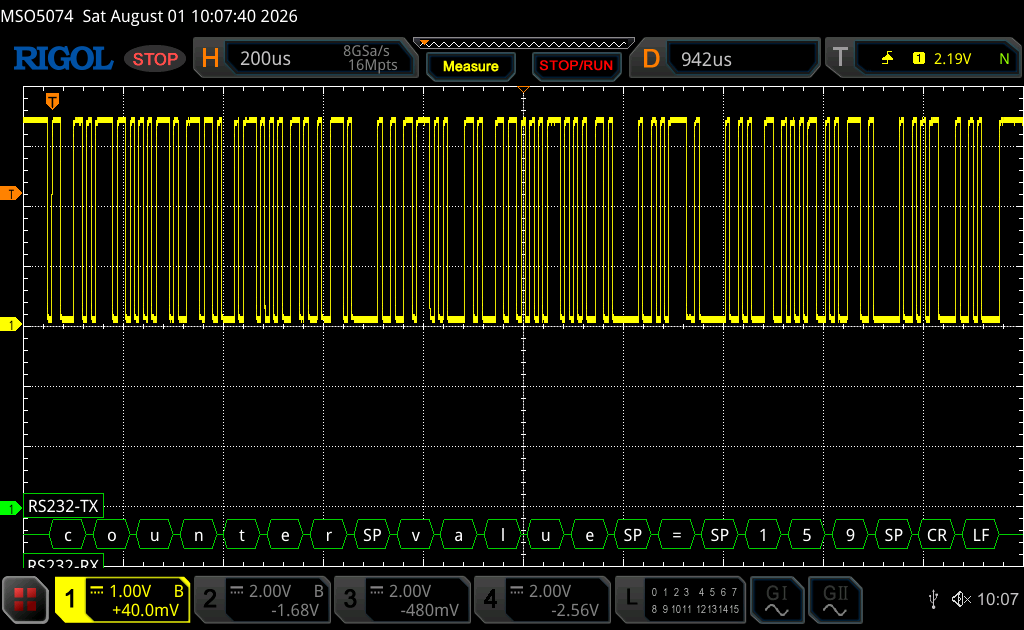
We have successfully transmit data using our software UART.
Next part, we shall start receiving data.
Stay tuned.
Happy coding 😉

1 Comment
Dear Respected Sir,
Namaskar, Greetings Wishes,
On this Special Occasion for presenting this Technical Presentation.
Seldomly people continue beyond a stage. In my View this is the 500th Episode.
But in your case, you have unconditionally maintained the Quality of Technical contents
Simple, Crystal clear, Thought prevoking Ideas.
Expecting such Interesting….expanding into the field of AI-Agents, & Agentic-AI’s
in HW-Domain especially to Micro-Controllers.
Thanking you with Warm regards,
HSR-Rao.
Add Comment