

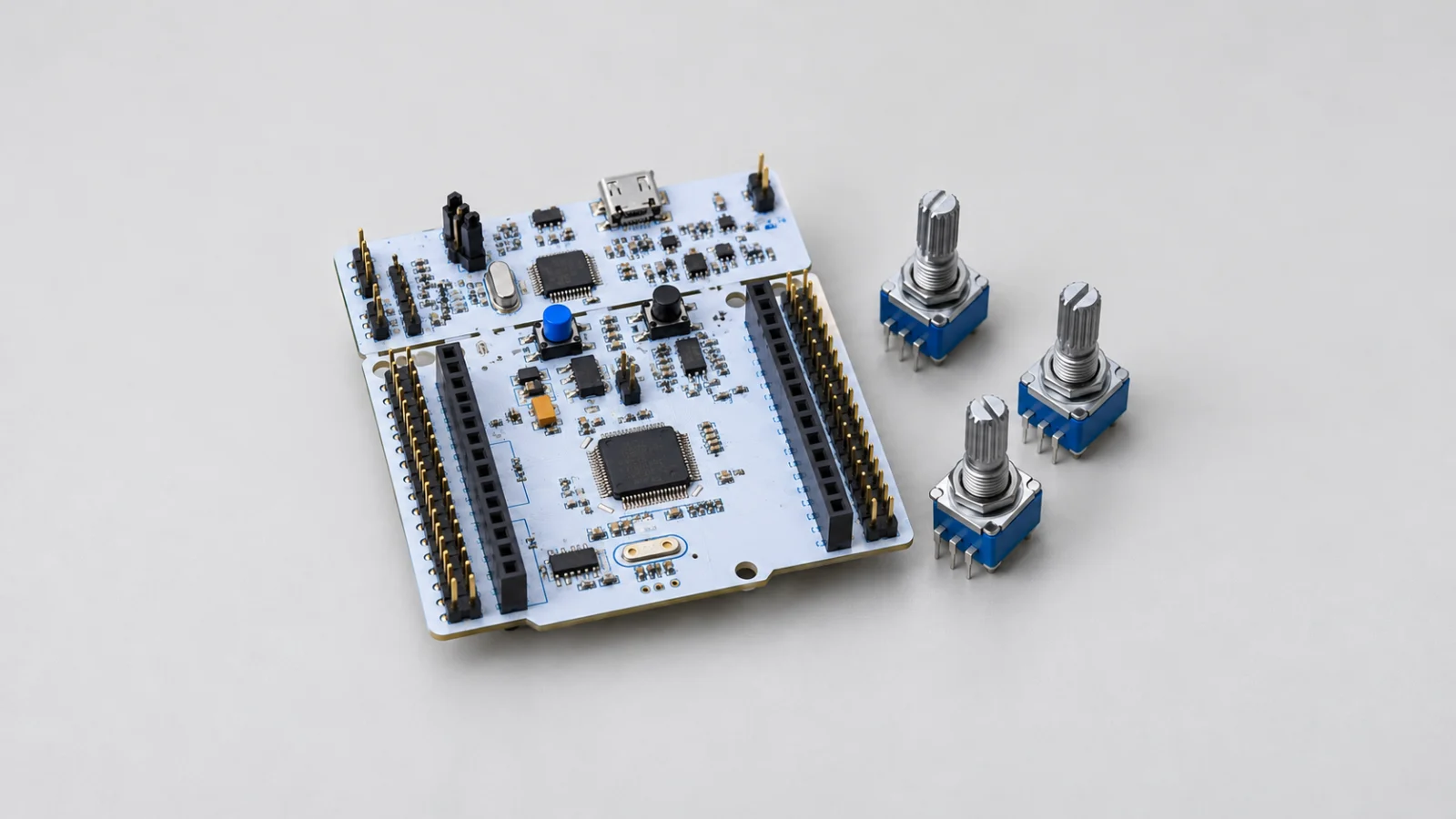
To achieve precise, deterministic sampling rates essential for digital signal processing and control systems, this guide explores using a hardware timer to trigger the STM32F4’s ADC. By configuring a timer’s Update Event to directly trigger ADC conversions via LL drivers, we eliminate software jitter and establish a perfectly timed, hardware-synchronized data acquisition pipeline.
In this guide, we shall cover the following:
- Introduction.
- STM32CubeMX configuration.
- Firmware development.
- Results.
1. Introduction:
In our journey through the STM32F4’s Analog-to-Digital Converter, we have progressively unlocked faster, more efficient, and more autonomous methods of data acquisition. We moved from simple polling, to non-blocking interrupts, to continuous DMA streaming, and finally to multi-channel DMA scanning. Each step has pushed the CPU further out of the data path, maximizing efficiency. However, all of these methods share one critical limitation: they lack precise control over exactly when the ADC samples the analog signal. In continuous mode, the ADC simply converts as fast as its clock and sampling time allow, producing a data stream with a fixed but somewhat arbitrary sample rate. For general sensor monitoring, this is fine. But for serious digital signal processing, that lack of timing precision is a fatal flaw.
The Critical Need for Deterministic Sampling
The cornerstone of Digital Signal Processing (DSP) is the Nyquist-Shannon sampling theorem, which dictates that to accurately reconstruct or analyze an analog signal, you must sample it at a precise, known, and rigidly fixed interval. If your sample rate fluctuates—even by a few microseconds—you introduce jitter. Jitter is the enemy of DSP. It manifests as phase noise, frequency distortion, and aliased artifacts in your FFT (Fast Fourier Transform) calculations.
When the ADC runs in continuous mode, the exact sample rate is determined by a combination of the ADC clock, the channel’s programmable sampling time, and any DMA bus arbitration delays. These variables can shift slightly based on system load, causing microscopic timing variations. Furthermore, if your software initiates conversions, the timing is at the mercy of the CPU’s interrupt latency, which varies depending on what the processor is doing at that exact moment.
To achieve true, laboratory-grade deterministic sampling, the conversion trigger must come from a pure hardware source, completely isolated from software execution variability. Enter the hardware timer.
The Perfect Trio: Timer + ADC + DMA
When you combine a hardware timer, the ADC, and the DMA controller, you create what is arguably the most powerful and elegant data acquisition architecture available on the STM32F4. Here is how this perfect synergy operates:
- The Timer (The Conductor): A hardware timer (such as TIM2 or TIM3) is configured to generate a precise Update Event at a specific, calculated frequency. For example, if you need exactly 10,000 samples per second, you configure the timer to overflow every 100 microseconds. This timer runs entirely in hardware.
- The ADC (The Sampler): Instead of triggering conversions via software or continuous mode, the ADC is placed in a mode where it waits for a hardware trigger. The timer’s Update Event is routed directly to the ADC’s internal trigger multiplexer (using the Trigger Output – TRGO). Every time the timer overflows, the ADC instantly captures a sample (or a full scan of multiple channels).
- The DMA (The Courier): As soon as the ADC finishes the conversion, the DMA controller autonomously pulls the data from the ADC data register and places it into your memory buffer. The CPU is never involved.
This creates a closed-loop, fully hardware-synchronized pipeline. The timer dictates the exact moment of sampling, the ADC performs the conversion, and the DMA moves the data. The result is a perfectly uniform, jitter-free stream of analog data appearing in RAM, with the CPU completely free to process that data at its leisure.
Real-World Applications of Timer-Triggered DMA Acquisition
This architecture is not just an academic exercise; it is the foundational backbone of countless professional, industrial, and consumer applications where timing is everything.
1. Digital Signal Processing (DSP) and Audio Processing: Audio applications require rigid sampling rates—commonly 44.1 kHz, 48 kHz, or 96 kHz. A timer-triggered ADC ensures that every single audio sample is captured at exactly the right microsecond, preventing pitch distortion and aliasing. This is essential for real-time audio equalization, noise cancellation, and voice recognition systems.
2. Motor Control and Field-Oriented Control (FOC): In high-performance motor control, particularly 3-phase BLDC (Brushless DC) or PMSM (Permanent Magnet Synchronous Motor) control, the ADC must sample the motor’s phase currents at the exact center of the PWM (Pulse Width Modulation) cycle. This synchronization is critical to measure the actual current flowing through the motor windings, free from switching noise. A timer-triggered ADC, synchronized to the PWM timer, makes precise Field-Oriented Control possible, enabling smooth, efficient, and silent motor operation in electric vehicles, drones, and industrial servos.
3. Power Quality Monitoring and Smart Grids: Monitoring AC power lines requires capturing high-resolution voltage and current waveforms to calculate RMS values, detect harmonics, and identify power anomalies. Timer-triggered ADC sampling allows the system to capture the 50Hz or 60Hz AC waveform with extreme precision, enabling accurate FFT analysis to detect power factor issues, harmonic distortion, or transient voltage spikes in real-time.
4. Vibration Analysis and Predictive Maintenance: In industrial environments, monitoring the vibration of rotating machinery (using accelerometers) at precise intervals allows for early detection of bearing wear, imbalance, or misalignment. The FFT of the vibration data requires a consistent time-domain sample. Timer-triggered ADC ensures the frequency analysis is accurate, allowing maintenance teams to predict and prevent catastrophic equipment failures.
5. Sensor Fusion and Data Logging: When fusing data from multiple analog sensors—such as IMUs, temperature arrays, and pressure sensors—having a rigid, synchronized sampling rate allows you to accurately correlate data streams in the time domain. This is critical for applications like weather stations, flight controllers, and autonomous robotics, where the relationship between sensor readings over time is just as important as the readings themselves.
The LL Driver Advantage: Surgical Precision in Trigger Routing
Configuring a timer to trigger the ADC via DMA involves navigating some of the most intricate routing matrices on the STM32F4. You must configure the timer’s TRGO output, map it to the correct ADC External Trigger Conversion (EXTSEL) selection, configure the ADC to wait for this trigger, and manage the DMA stream’s circular buffering.
Using the HAL library for this level of hardware interconnect is not only slow, but the opaque abstraction layers often obscure the exact trigger source selection, making debugging a nightmare when the ADC simply refuses to fire. By utilizing the LL Drivers, we maintain surgical precision over every register. We will manually select the timer’s TRGO as the ADC trigger source, configure the trigger edge (Rising edge), and enable the DMA request specifically on the End of Regular Sequence (EOS) rather than the End of Single Conversion (EOC) for multi-channel sweeps. This bare-metal approach guarantees that our timing is dictated by pure silicon physics, not software abstraction, resulting in a robust, professional-grade data acquisition system ready for the most demanding DSP and control applications.
In the following sections, we will configure the hardware timer to generate our precise trigger frequency, link it to the ADC via LL register configurations, and finalize the DMA circular buffer to capture our perfectly timed, multi-channel analog data pipeline.
2. STM32CubeMX Configuration:
We shall continue from this guide.
Open the project’s ioc in STM32CubeMX.
From analog, ADC1, configure the ADC as follows:
- Disable the Continuous Mode.
- Set the external Trigger to be Timer 2 Trigger Out even.
- Set PA5 as GPIO as output.

Next, from Timers, TIM2, configure it as follows:
- Set clock source to Internal Clock
- Set the Prescaler to 16000-1.
- Set the timer period to 100-1.
- Set trigger event selection to Update Event.

With this configuration, we shall trigger the timer each 100ms.
Next, from System Core, NVIC, Code Generation:
- Enable ADC1, ADC2 and ADC3 interrupt along side DMA0 Stream 0 interrupt.
- Disable Generate IRQ handler for ADC and DMA

Finally, from Project Manger, Advanced Settings, set TIM to LL from driver selector.

Click on Generate Code.
Thats all for STM32CubeMX configuration.
3. Firmware Development:
Open the project in STM32CubeIDE.
First, there is a bug in STM32CubeMX when generating timer configuration in LL.
Open tim.c source file.
In the source file, in MX_TIM2_Init funciton.
In user code begin TIM2_Init 2 in the function, add the following two lines:
  TIM_InitStruct.Autoreload = 100;
  LL_TIM_Init(TIM2, &TIM_InitStruct);
This will configure the timer period to the correct value.
Next, open adc.h header file.
In user code begin prototypes, declare the following function:
void ADC_Start_DMA_MultiChannnel_TIM2Trig(uint16_t *adcBuff, uint16_t len);
This function shall start the ADC in DMA mode while being triggered by the timer.
The function takes the following parameters:
- Point to the buffer to hold the measured adc values.
- Length of the buffer, in most cases, same as number of channels.
Next, open adc.c source file.
In user code begin 1 declare the following weak functions:
__weak void ADC_DMA_TransferCompleteCallback(void)
{

}

__weak void ADC_DMA_HalfTransferCallback(void)
{

}

__weak void ADC_DMA_TransferErrorCallback(void)
{
}
These functions shall be called when DMA finishes transferring the data from ADC to the buffer, half of the transfer and in case of error.
Next, for ADC_Start_DMA_MultiChannnel_TIM2Trig function:
Disable the DMA and ensure the DMA is disabled as follows:
    LL_DMA_DisableStream(DMA2, LL_DMA_STREAM_0);
    while (LL_DMA_IsEnabledStream(DMA2, LL_DMA_STREAM_0));
Configure the DMA:
    LL_DMA_SetPeriphAddress(DMA2, LL_DMA_STREAM_0,
        LL_ADC_DMA_GetRegAddr(ADC1, LL_ADC_DMA_REG_REGULAR_DATA));
    LL_DMA_SetMemoryAddress(DMA2, LL_DMA_STREAM_0, (uint32_t)adcBuff);
    LL_DMA_SetDataLength(DMA2, LL_DMA_STREAM_0, len);
Disable the ADC to reconfigure just in case:
    LL_ADC_Disable(ADC1);
    while (LL_ADC_IsEnabled(ADC1));
Next, ARM the DMA and start the ADC:
    /* Arm DMA first, then enable ADC (no SW start) */
    LL_DMA_EnableStream(DMA2, LL_DMA_STREAM_0);
    LL_ADC_Enable(ADC1);
Finally, start the timer:
    /* Start TIM2 so TRGO begins driving conversions */
    LL_TIM_SetCounter(TIM2, 0);
    LL_TIM_EnableCounter(TIM2);
Hence, the function as follows:
void ADC_Start_DMA_MultiChannnel_TIM2Trig(uint16_t *adcBuff, uint16_t len)
{
    /* Stop DMA */
    LL_DMA_DisableStream(DMA2, LL_DMA_STREAM_0);
    while (LL_DMA_IsEnabledStream(DMA2, LL_DMA_STREAM_0));


    /* Reconfigure DMA */
    LL_DMA_SetPeriphAddress(DMA2, LL_DMA_STREAM_0,
        LL_ADC_DMA_GetRegAddr(ADC1, LL_ADC_DMA_REG_REGULAR_DATA));
    LL_DMA_SetMemoryAddress(DMA2, LL_DMA_STREAM_0, (uint32_t)adcBuff);
    LL_DMA_SetDataLength(DMA2, LL_DMA_STREAM_0, len);

    /* Disable ADC to allow reconfiguration */
    LL_ADC_Disable(ADC1);
    while (LL_ADC_IsEnabled(ADC1));


    /* Arm DMA first, then enable ADC (no SW start) */
    LL_DMA_EnableStream(DMA2, LL_DMA_STREAM_0);
    LL_ADC_Enable(ADC1);

    /* Start TIM2 so TRGO begins driving conversions */
    LL_TIM_SetCounter(TIM2, 0);
    LL_TIM_EnableCounter(TIM2);
}
As for the interrupt handler:
Check which interrupt source:
void DMA2_Stream0_IRQHandler(void)
{
    if (LL_DMA_IsActiveFlag_TC0(DMA2))
    {
        LL_DMA_ClearFlag_TC0(DMA2);
        ADC_DMA_TransferCompleteCallback();
    }
    else if (LL_DMA_IsActiveFlag_HT0(DMA2))
    {
        LL_DMA_ClearFlag_HT0(DMA2);
        ADC_DMA_HalfTransferCallback();
    }
    else if (LL_DMA_IsActiveFlag_TE0(DMA2))
    {
        LL_DMA_ClearFlag_TE0(DMA2);
        ADC_DMA_TransferErrorCallback();
    }
}
Thats all for the adc.c
Next, open the main.c file:
In user code begin 2, start the ADC in DMA mode with timer trigger as follows:
ADC_Start_DMA_MultiChannnel_TIM2Trig(adc_value,4);
Next, in user code begin 0, call ADC_DMA_TransferCompleteCallback as follows:
void ADC_DMA_TransferCompleteCallback(void)
{
	LL_GPIO_TogglePin(GPIOA, LL_GPIO_PIN_5);
}
We shall toggle pin PA5.
Thats all for the guide.
Save, build the project and run it as follows:

You may download the project from our github repository from here.
4. Results:
Open a debugging session, add adc_value to live expression, you should get something like this:
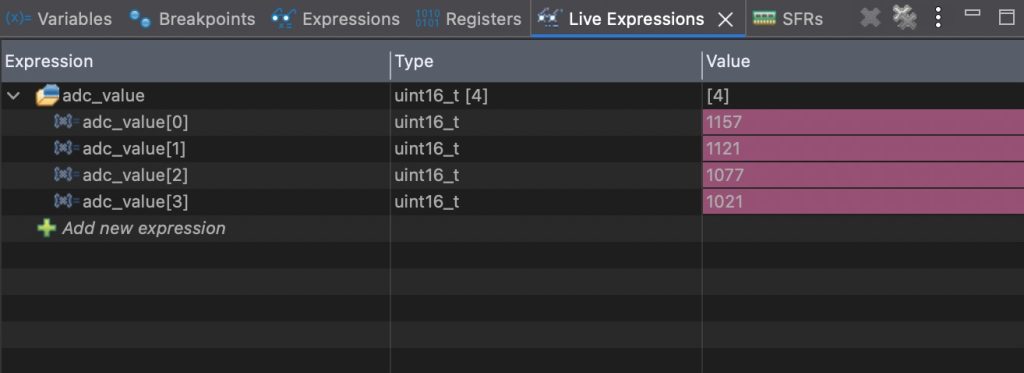
By probing PA5 with logic probe or oscilloscope, you will notice that the PA5 will be toggled each 100ms as we configured the timer.

Happy coding 😉
Discussion