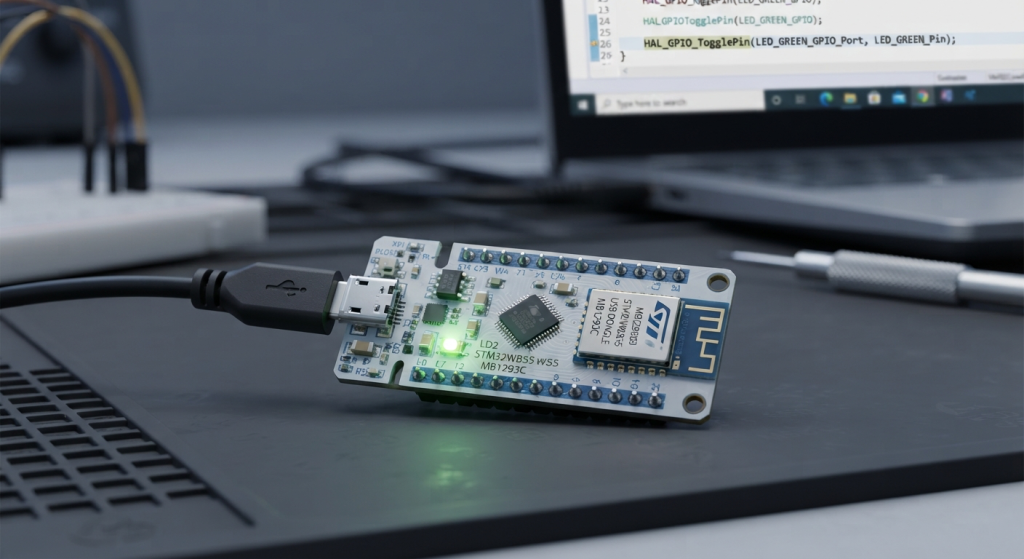
In Part 3 of our series, we will configure GATT Services and Characteristics on the STM32WB55 to establish two-way data communication with your smartphone. You’ll learn how to handle read, write, and notification operations to seamlessly transmit real-time telemetry and process incoming mobile commands.
In this guide, we shall cover the following:
- Firmware development.
- Results.
1. Firmware Development:
In order to develop the BLE firmware, you need two source files, custom_stm.c and custom_app.c.
Open custom_stm.c source file.
In line 193 which states:
else if (attribute_modified->Attr_Handle == (CustomContext.CustomMy_Rx_CharHdle + CHARACTERISTIC_VALUE_ATTRIBUTE_OFFSET))
In
/* USER CODE BEGIN CUSTOM_STM_Service_1_Char_2_ACI_GATT_ATTRIBUTE_MODIFIED_VSEVT_CODE */
Add the following:
Notification.Custom_Evt_Opcode = CUSTOM_STM_MY_RX_CHAR_WRITE_NO_RESP_EVT;
Notification.DataTransfered.pPayload = attribute_modified->Attr_Data;
Notification.DataTransfered.Length = attribute_modified->Attr_Data_Length;
Custom_STM_App_Notification(&Notification);
This code packages the data that the phone just wrote into a notification structure: it sets the event type to CUSTOM_STM_MY_RX_CHAR_WRITE_NO_RESP_EVT, stores a pointer to the received bytes in pPayload, and stores the byte count in Length. It then calls Custom_STM_App_Notification() to hand this structure to custom_app.c, where your RX handler (CUSTOM_STM_MY_RX_CHAR_WRITE_NO_RESP_EVT case) can copy the data into rxBuffer for your application to use. In short, these 4 lines are the bridge between the BLE stack’s low-level event and your high-level application code.
Next, in custom_app.c source file:
In user code begin PV, declare the following:
#define MAX_DATA_LENGTH 20
static uint8_t  rxBuffer[MAX_DATA_LENGTH];
static uint16_t rxDataLength = 0;
static uint8_t  newDataReceived = 0;
static uint8_t  notificationsEnabled = 0;
Next, in
/* USER CODE BEGIN PFP */
Declare the following:
uint8_t Send_Data_To_Phone(uint8_t *data, uint16_t length);
This function shall send the data to the phone.
Next, in:
case CUSTOM_STM_MY_TX_CHAR_NOTIFY_ENABLED_EVT:
Set the notification enabled to 1:
notificationsEnabled = 1;
In
case CUSTOM_STM_MY_TX_CHAR_NOTIFY_DISABLED_EVT:
Set notification enabled to 0.
notificationsEnabled = 0;
Next, in
case CUSTOM_STM_MY_RX_CHAR_WRITE_NO_RESP_EVT:
Add the following:
uint16_t receivedLength = pNotification->DataTransfered.Length;
uint8_t *receivedData = pNotification->DataTransfered.pPayload;

// Copy received data to our safe buffer
memcpy(rxBuffer, receivedData, receivedLength);
rxDataLength = receivedLength;

// Echo back the received data to confirm (optional debug print)
APP_DBG_MSG(">> Data received from phone! Length: %d bytes\n", rxDataLength);

// Example processing:
if (rxDataLength >= 1) {
  switch (rxBuffer[0]) {
    case 0x01:
      APP_DBG_MSG(">> Command 01 received\n");
      // Do something
      break;
    case 0x02:
      APP_DBG_MSG(">> Command 02 received\n");
      // Do something else
      break;
    default:
      APP_DBG_MSG(">> Unknown command: 0x%02X\n", rxBuffer[0]);
      break;
  }
}
Next, in user code begin FD:
uint8_t Send_Data_To_Phone(uint8_t *data, uint16_t length)
{
    if (!notificationsEnabled) return 0;
    if (length > MAX_DATA_LENGTH) length = MAX_DATA_LENGTH;
    memcpy(UpdateCharData, data, length);
    Custom_STM_App_Update_Char(CUSTOM_STM_MY_TX_CHAR, UpdateCharData);
    return 1;
}
Here’s what this function does, in three sentences:
- It first checks that the phone has actually enabled notifications on the TX characteristic (
notificationsEnabled) and clamps the requested length toMAX_DATA_LENGTH, returning0early if notifications are off. - It then copies your data into the shared buffer
UpdateCharData— the same buffer the ST framework’s TX characteristic uses internally. - Finally, it calls
Custom_STM_App_Update_Char()withCUSTOM_STM_MY_TX_CHAR, which triggers the BLE stack to push that buffer to the phone as a Notification, and returns1to signal success.
Next, declare the following function:
uint16_t Get_Data_From_Phone(uint8_t *buffer, uint16_t maxLength) {
    uint16_t copyLength = (rxDataLength < maxLength) ? rxDataLength : maxLength;
    memcpy(buffer, rxBuffer, copyLength);
    return copyLength;
}
Here’s what this function does, in three sentences:
- It calculates how many bytes to copy by taking the smaller of two values —
rxDataLength(how many bytes the phone last sent) andmaxLength(the caller’s buffer size) — to prevent a buffer overflow. - It then copies that many bytes from the internal
rxBuffer(filled earlier by the RX event handler) into the caller-suppliedbuffer. - Finally, it returns
copyLength, telling the caller exactly how many valid bytes were written so the application knows how much data to process.
Finally, simple test to be sent to the phone:
void Send_Test_Data(void) {
    static uint8_t counter = 0;
    uint8_t testData[4];

    testData[0] = 0xAA;  // Header
    testData[1] = counter++;
    testData[2] = ~counter;
    testData[3] = 0x55;  // Footer

    Send_Data_To_Phone(testData, 4);
    APP_DBG_MSG(">> Sent test data: counter = %d\n", testData[1]);
}
Next, open main.c source file:
In user code begin code 0, declare the following:
extern uint8_t Send_Data_To_Phone(uint8_t *data, uint16_t length);
extern void Send_Test_Data(void);

uint32_t lastTestSendTime;
Next, in user code begin 3 in while 1 loop:
if (HAL_GetTick() - lastTestSendTime > 1000) {
  // Check if we're connected (notificationsEnabled is in custom_app.c)
  // We'll check by trying to send, or use a global flag
  Send_Test_Data();
  lastTestSendTime = HAL_GetTick();
}
We shall send data periodically each 1 second.
Thats all for the firmware.
Save, build the project and run it as follows:

You may download the project from our github repository from here.
2. Results:
Start a debugging session.
Add rxBuffer from custom_app.c source file to live expression.
Using LightBlue, open the services that starts with 0x1235, send some string like Embedded:
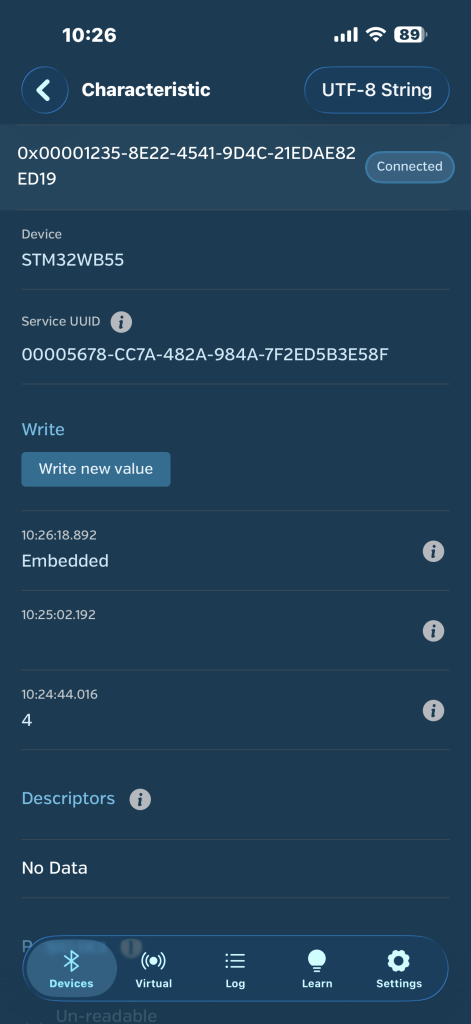
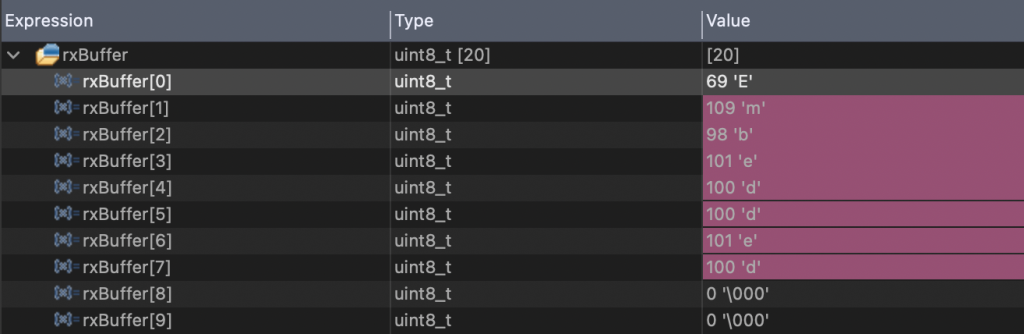
You will notice that rxBuffer is filled with “Embedded”
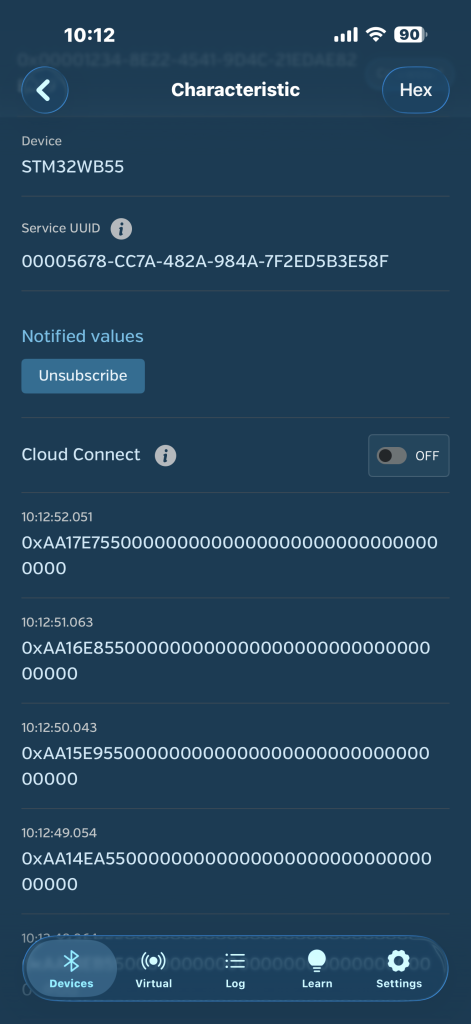
Next, open a service thats starts with 0x1234:
Note that the value is being updated each 1 second as we set it in the while loop.
Now, you have full functioning BLE firmware that will have the ability to send and receive data up to 20 bytes.
Happy coding 😉

Add Comment